Updated on December 8, 2020 by Syed Sadique Hassan
In this guide, we will show you the steps to change your Snapchat password. Likewise, the steps to reset your password will also be shared. This multimedia messaging app stands by its USP of self-expiring pictures and messages. Well, it is due to this feature itself why it has managed to stand out from among the crowds. It has also incorporated some security measures in the form of end-to-end encryption and the My Eyes Only feature.
From your end, you should also consider using a strong password. This could consist of both upper and lower case letters as well as numbers and symbols. Along the same lines, it is always a good idea to never stick with the same password, rather you should change it after regular intervals. And in this guide, we will show you how to do just that. Given below are the detailed instructions to change your Snapchat password. Likewise, we will also show you how to reset your password in case you have forgotten the existing one. Follow along.
How To Change Snapchat Password
First off, let’s start with the steps to change your account password. Here are the required instructions for the same:
- Launch the Snapchat app on your device
- Then tap on your avatar situated at the top left.
- You will then be taken to your profile, tap on the Settings icon at the top right.
- Head over to the Password section and type in your current password.
- Now enter the new password of your choice and then type in again to confirm it. Make sure to chose a strong password consisting of letters, numbers, and symbols.
- Finally, hit Save and that’s it. You have successfully changed your Snapchat password.
How to Reset Password
In case you have forgotten your Snapchat password and hence cannot access your account, then you will have to reset it and create a new one. For that, you will need to have access to your registered mobile number or email address. Keeping that in mind, here are the required steps:
- From the Snapchat login screen, enter your email or username.
- Then tap on the ‘Forget your Password?’ link situated at the bottom.
- Now select how would you like to reset your password: via Email or Phone.
- If you select Email, you will be mailed a password reset link. Open that link and proceed with the on-screen instructions to reset your password.
- On the other hand, if you chose ‘via Phone’, then enter your mobile number and tap Continue.
- Then select ‘Send via SMS’ or ‘Call me’ to get your six-digit verification code.
- Copy that code, enter it in Snapchat, and hit Continue.
- Finally, enter the new password in the space provided and that’s it.
These were the steps to change and reset your Snapchat password. If you have any queries concerning the aforementioned steps, do let us know in the comments section below. Rounding off, here are some equally useful iPhone Tips and Tricks, PC tips and tricks, and Android Tips and Tricks that you should check out as well.
About Syed Sadique Hassan
Did his MBA from Delhi but then something about the Android ecosystem intrigued him so much that he made Tech Blogging his permanent job. And now there’s no looking back.
As we mentioned in our discussion of Snapchat safety and privacy, one of the key ways to stay safe on Snapchat is to not let anyone else use your account. Part of this strategy should include a strong password to keep other people from logging in under your name. This lesson will show you how to replace your current Snapchat account password with a stronger one, if you should feel the need to.
For tips on how to come up with passwords that are both secure and easy to remember, see our How to Make a Strong Password tutorial.
To change a Snapchat password:
1. Turn on your mobile device, open “Snapchat”, and log into it.
2. Tap the “ghost” icon to go to your profile.
The ghost icon is in the top-middle of the main screen on Snapchat.
3. Tap the “gear” icon to go to your settings.
The gear icon is in the top-right corner of your profile screen.
4. Tap “Password”.
If you don’t immediately see the Password option, scroll down through your settings menu.
5. Enter your former password, and then tap “Continue”.
To change your Snapchat password, you must enter your old one first. Use your (virtual) keyboard on your mobile device to type it in, and then tap Continue.
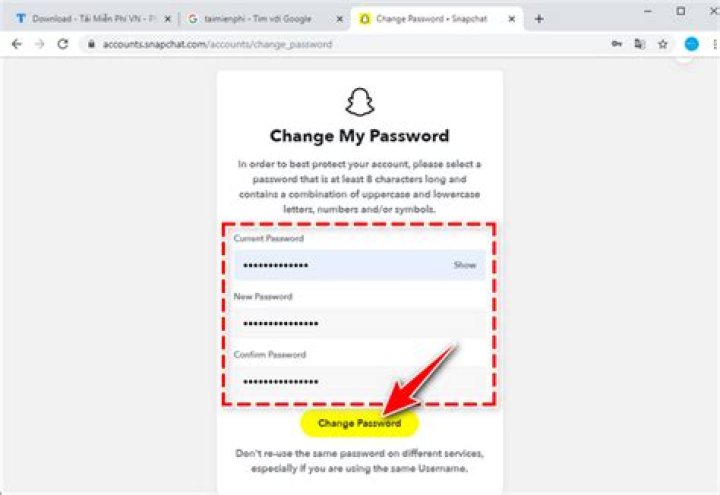
6. Enter a new password, as well as a copy of it, and then tap “Save”.
Tap in the box labelled “New Password” and type in your new password. It must be at least 8 characters long, and contain at least two character types (lower-case letters, upper-case letters, numbers, or symbols). Then, tap in the box labelled “Confirm Password” and re-type your new password. When both boxes match, tap Save.
Alright! You now have a brand new password protecting your Snapchat account.
If you can’t log into your Snapchat account because you’ve forgotten your password or your account has otherwise been compromised, we’ll show you what to do in this reset your Snapchat password tutorial.
You can easily change Snapchat password using the mobile app. This can easily be done from the settings section. You can also perform this task from a computer browser by resetting the password. All you need is the email address associated with the account.
Snapchat is a popular messaging app that’s available on mobile devices. It was first released in 2011 and featured pictures and messages that disappear after a period of time. Today, it has over 210 million active daily users and is considered as one of the leading social messaging apps for the younger audience.
Changing your Snapchat password
It’s always a good idea to regularly change your passwords. This prevents your account from being accessed by unauthorized users in case a password breach occurs, and trust me, these breaches now occur regularly. Here’s what you need to do to change your password.
Method 1: Using the Snapchat app
The fastest way you can change the password is by using the app.
Time needed: 5 minutes.
Change Password of Snapchat
You can do this by swiping up from the home screen of your phone then tapping on the app icon.
Tap on the profile picture field.
This is located on the upper left side of the app.
Tap on Settings.
This is the gear icon located on the upper right side of the app.
Tap on Password.
This allows you to set a new password. You will need to enter the old password first.
Enter the old password then tap on continue.
This is the current password that you are using.
Enter your new password and confirm it.
This will be the new password you will be using.
Method 2: Using the Snapchat website to perform a password reset
You can reset your password via email from the password reset website. This method is recommended if you have forgotten your account password. Make sure you have access to the email.
- Go to the Snapchat reset password website at
- Enter the email address associated with the account then click on submit.
- Open the email and click on the link sent to reset your password.
After performing the steps listed above you will successfully change Snapchat password.
Visit our TheDroidGuy Youtube Channel for more troubleshooting videos.
Last updated on March 14, 2019 by Ekaant Puri 2 Comments
Hello friends, Today I will share 3 methods on how to recover Snapchat account. Users can recover Snapcaht account on both Smartphone or PC. You can retrieve using your email or phone number. I have also shared a method to recover a Snapchat account without a password, email or phone number verification. You can directly contact Snapchat to recover your account.
When we talk about recovering any social media account, then the first picture came up in our mind is to recover the password of that account. There are also several other ways to recover Social Media account like verify phone number and email. But most important still needed is your password or access to any of the ways to recover the account. It may be possible that you have lost the password and no access left to recover your Snapchat account and might want to recover it. But, the problem that arises here is that many of us don’t know about how to recover a Snapchat account. Well, there are plenty of ways available by which one can easily recover Snapchat account without facing any problem.
How to Recover Snapchat Account With or Without Password/Email/Number
The fortunate ways to recover Snapchat account is given in this section of the article. There are two ways to recover a Snapchat account. A user can do it using the Snapchat’s website or its official app. The most important thing is that you must have either the email address or phone number which is linked to your Snapchat account which you are going to recover. Somehow, if you don’t have access to any of these things then have to contact the Snapchat’s Help Team for further assistance.
Method 01: Using Snapchat’s Website
If you want to recover your Snapchat account and have the access of your email address which you have linked to the account. Then, of course, you can recover your Snapchat account using that email address from the Snapchat’s official website. There is a fortunate method which I have discussed here, and you should check it out.
- On a web browser open the Link.
- Now, click on the Forgot Password option.
- Then, provide an email address to it and click on the Submit button.
- After that, fill up the captcha for that.
- You will get an email regarding resetting your password from Snapchat.
- Open the link from your email account and click on it.
- Now, enter your new password twice and click on the Change Password button.
- That it. Your password will be changed successfully.
Method 02: Using Snapchat App
Maybe you don’t know your email address and even don’t have access to your email address which is linked to your account. Then, how to recover Snapchat account without an email address? Very simple, you have to use the phone number instead of it. If you have it, then this method is going to pick you out from the trouble.
- Open the Snapchat app on your mobile phone.
- Now, click on the Login option.
- Then, type username or email and click Forgot your password option.
- After that, you have to choose whether you want to reset your account using phone or email. Select one which you think will be appropriate for me.
- I want to recommend that you chose the phone number.
- Now, fill out the captcha form.
- Then, enter your number and click Continue.
- After that, select Send via SMS option to send OTP.
- Now, enter that OTP and click Continue button.
- Enter your new password two times and click Continue.
- Done! The account has been recovered successfully.
Snapchat Change Password
If you only want to change the password of your existing Snapchat account then definitely this section is for you. Here, you can learn about how you have to change the Snapchat account password which you are using. You can do it using the Snapchat app which you are currently using in your mobile phone or tablet. The full step by step guide is given in this part of the article. The method is very simple and straightforward so that it will be easy to follow the guide to change the password.
- Open the Snapchat app.
- Click on the Profile icon.
- Now, click on the Settings.
- Scroll down and click on Password.
- Enter the old password of your Snapchat account.
- On the next page, enter your new password and re-enter it again.
- Lastly, click on the Save button to change the Snapchat password.
How to Recover Snapchat Account Without Password, Email or Phone Number
It may be possible that you don’t have any credentials of your Snapchat account such as the password of the account, email address or phone number. Then, what is the procedure to recover Snapchat account without having a password, email or phone number? It is very simple where you have to contact to the Snapchat Help Team. Snapchat Help Team LINK will talk to you personally where you can explain the problem to them, and then they will help you in that. Otherwise, there is no way to recover Snapchat account without a password, email or phone number.
Conclusion
We have seen how to recover Snapchat account and how we can change the password of a Snapchat account. The methods which I have described here are the only ways to recover a Snapchat account as well as to change the password. Also, I would like to tell you that both methods require an email address and phone number. So, if you don’t have any of these right now, then you have to contact the Help Team of the Snapchat. I hope you have one of them and successfully recovered your account. Share this article with your friends or family members so that they can also retrieve their account if they need.
Hi friends, If you forgot your snapchat password and don’t know how to reset it read this article because today I am going to share Trick to Reset Snapchat Password.
The Snapchat security breach, which compromised over 8 million accounts, has brought the need for frequent password resetting to the forefront. By changing your password periodically, you will be able to minimize the chances of somebody logging into your account without your permission. If you are all ready to change your user details, here is a look at how to reset Snapchat Password.
What will you need?
Before you read the instructions for how to reset Snapchat password, make sure you have the following information handy.
• To reset your password, you will need to have your log in information, including the old password
• If the above details are not available, you will need to know the email id that you used when registering with the service and you should be able to access this email account
If you cannot remember your current password and have been logged out of your account, you will be asked to furnish the email id given at the time of registration. Snapchat will send a password reset mail to the account.
If for some reason you cannot access the inbox of this email id or if you did not supply this information when registering with the service, Snapchat will not be able to reset your password.
How to reset Snapchat password?
Step 1: The Snapchat password reset page at can be used to change your password or to recover the existing password. On the page, you will be asked to provide the email id of registration. Simply enter this address and you will receive an email with the instructions on how to reset Snapchat password.
Step 2: Choose a new password that has at least 8 characters and to enhance security, ensure that it cannot be easily linked with you. For instance, using your birth date, initials or even the name of one of your parents will be too easy. Pick something that is random, that you will remember and yet it cannot be connected with you by everybody who even knows you casually.
Step 3: If you continue to experience problems or do not receive the instructional mail from Snapchat, contact them through mail at [email protected]
This is the way Snapchat prescribes that you do things, but it is also possible to reset passwords on Snapchat by using their unofficial client Swapchat. The app for Windows phones lists the ability to reset passwords among its key features and is definitely worth a try if you don’t have an iPhone handy. Of course, you could always use another device, mobile or not, that will allow you to log on to the Snapchat service page.
Ideally, you should reset your Snapchat password at least once a month. Typically, it takes no more than a few minutes to do so and is definitely worth the time given the fact that most people also have their phone numbers listed in their Snapchat account data. If you remember your log in details, things can be simpler. All you have to do is log into your account and change your username or your password.
I hope this post will help you to reset your snapchat password, if you like this post then don’t forget to share with your lovely friends. keep visiting for more tips and tricks.
In the unfortunate event that you forget the password to your Snapchat account — or in the REALLY unfortunate event that you think someone else can get into and use your account — you can deactivate your current password and pick a new one. This lesson will show you how.
Ironically, though Snapchat is an application for mobile devices, you have to go to Snapchat’s website to reset your password. The same is true if you wish to delete your Snapchat account.
To reset your Snapchat password:
1. Open your web browser, go to and click “Support”.
The Support option is underneath the “Company” category, so scroll down a bit if you don’t immediately see it.
2. Click “How Do I Reset a Forgotten Password?”
You should see this option on the support menu under the “Popular Topics” category.
3. Enter your email address, and pass the security check.
On the next screen, click in the box labelled “Email” and type in your email address. Next, click in the check box labelled “I’m Not a Robot” to pass a security check; this tells Snapchat that you’re not an automated computer program trying to cause trouble. Finally, click Submit.
Snapchat will send an email to the address you entered with instructions on how to reset your password.
4. Log into your email client, open the email from Team Snapchat, and click the password reset link.
Go to your email client and log in. Find the email from Team Snapchat labelled “Snapchat Password Reset” and click on it to open it. Click on the blue hyperlink (blurred out here for privacy purposes) within the email to continue.
You will be directed to a form that will let you reset your password.
5. Type in and confirm your new password.
Click in the box labelled “New Password” and type in the password that you would like to use to protect your Snapchat account with from now on. Like if you change your Snapchat password, your new password must be at least 8 characters long, and must contain at least two character types (i.e. lower-case letters, upper-case letters, numbers, or symbols). Then, click in the box labelled “Re-Enter New Password” and type in a copy of the password that you just picked. When you’re done, click Change Password.
There! You have successfully reset the password for your Snapchat account!
Snapchat today is the most used app for sharing snaps and its variety of filters allows it to grow its user base. When we talk about snaps and images the most important thing that came to our mind is a security concern. Snapchat has provided the best feature to protect your privacy from saving Snapchat. This new feature “My Eyes Only” provides its users to protect their selfies and videos with a password. Though it’s a new feature and you might not be knowing much about this feature. Many people don’t know all the settings of this feature and still face a problem with this feature. People wonder what will happen to their snaps if they forget their password.
This feature is really exciting and provides an ultra safety feature. This not only provides safety to your pictures and videos. But this feature also hides them from getting seen while any third-party is scrolling from your memories section.
Here are easy ways that will help you in how to change my eyes only password whether you know the old password or not.
Although it is not possible to get the old password if you forget. But if you know your old password and want to change it. If you have any suspicion that someone knows and wants to change for the safer side than you can use this way.
How to change my eyes only password
- Step 1: Open the Snapchat application from your application drawer and log in to your account using your credentials.
- Step 2: In your Snapchat profile camera section will open, swipe up to the memories section where all your snaps are stored.
- Step 3: There you will see the “My Eye Only” option. If not go and make it active.
- Step 4: Tap on the ‘My Eyes Only’ button or swipe to open the tab that will ask you for the My Eyes Only password.
- Step 5: Now hit the “option” tab on the right bottom of the page. Tap over the change passcode(if you remember the old password) option present on your screen.
- Step 6: After hitting that button the screen would ask you for your current password. Enter in the space all the things require an old password and new password.
- Step 7: it will then ask you to confirm by hitting the continue tab.
Congratulation, it’s done. Now you can open this feature with the new passcode you have set.
How to change my eyes only password, when you know your old password.
If you forget your old passcode recovering old pictures or videos is not possible. Due to the Snapchat security polices they delete old snaps before recovering and giving you and new passcode. You can regenerate the new passcode again, but won’t be able to access your old snaps and stories.
All the steps are the same until step 4. Open > login > open memories section > slide to “My Eyes Only”. After these follow these steps.
- Step 1: Now hit the “option” tab on the right bottom of the page. Tap over the forgot passcode(if you remember the old password) option present on your screen.
- Step 2: They will ask you for your Snapchat account password.
- Step 3: This will open a pop-up box asking the password for your Snapchat Account. Enter your Snapchat Account Password. But if you don’t know Snapchat password also change Snapchat passcode as well through your linked number or Gmail.
- Step 4: After that, follow the steps and Snapchat instructions of sending a link to your email and asking you to reset it and enter new code,
- Step 5: It will ask you for confirmation and delete all our older snaps in the safe vault. Hit the continue tab and its done.
I hope you find this article helpful for you if you have doubt about how to change my eyes only password.
How to hack Snapchat account. The post tells you to hack a Snapchat account, the possible methods you can try. Please note that we never recommend anyone to hack someone’s Snapchat account.
Reasons why you might want a Snapchat password hack
- To gain your own account back
- Play a prank on one of your friends
- Take control of a dormant Snapchat account that a significance to you
You just need to know some of the friends of Snapchat. Here we go with some of the best methods to Hack Snapchat account.
Method 1. Hack Snapchat with Account online using Snaptool
Using Snaptool one of the best methods to hack a Snapchat account. Snaptool requires no survey or download, and do not demand money.
They created Snapchat Hacks with user-friendliness in mind. Just visit the website and follow their instructions to hack any Snapchat accounts easily.
Method 2. Using SnapBreaker
Next is to hack Snapchat account using SnapBreaker. Snapbreaker helps you to download users private photos, videos and chats anonymously in up to 60 days of history.
- Visit the website and click the “Start Hacking Accounts”.
- Simply enter the victim’s username.
- Select “Hack Password” to decrypt victims password.
- Download videos, images and Click “I Agree and Continue” button.
Method 3. Using Snepspy
Snepspy is another tool that can use to Hack Snapchat account. It is really easy to use this. You will have to enter the username you want to hack. You have the option to opt for Password hack, downloading images, and conversation logs.
Method 4. Hack Snapchat Password using Snapch
Snapch has been used by tons of users and gets good results. There is no download required and easy to use. Since it was a lightweight tool and fast processing, anyone can try to hack any Snapchat users account.
Method 5. Using Snapthief
Snapthief is really easier than you imagine. You just need to enter the username you want to hack and click on Start spying to go. You can see the system process is searching for users details and data.
After the process, you can select the options among Snap Sent, Snap Received, Chat Received, Snap Screenshot, etc. You select any of the options and move forward. The site stores information about recently hacked Snapchat accounts.
Method 6. Using SnapexPilot
SnapexPilot claims them as 1# Snapchat Hack/Spy Tool where you can get Videos, Pictures & Chat Logs of any Snapchat account. Here, you are you are not hacking Snapchat passwords because they already hacked most of users account. You are just downloading data’s from them.
Method 7. Use Appbrute for iOS and Android
Here comes the first app that wors as an app for Android and iOS devices. There is a version available for both Windows and Mac. Appbrute is mainly used when you can’t reset your password through Snapchat.
Method 8. Using Snapbrute to Hack Snapchat Password
Snapbrute comes next into our list. Snapbrute’s password hacking method is really easy to use. Just enter the victim’s username and click “Start Hack”. Just follow the steps and finally, you will get videos, chat logs and images of any victims Snapchat account.
Method 9. Using Fewhacks
Using Fewhacks helps you to hack any Snapchat accounts easily. The website doesn’t require any downloads or installations to start the process. You just need to add put the victim’s username and just follow the website instructions to hack the Snapchat account.
Method 10. Using AppBrute
Using AppBrute lets you hack Snapchat accounts easily. It is a popular all in one Snapchat hack tool that works on iOS, Android, Windows, and Mac. All you need is the username or the email address of the Snapchat account.
Method 11. Using Pass Decoder
Password Revelator Pass Decoder comes next in our list. It is not like other Snapchat Hacker tools, you need to install a piece of software on your PC to get started. While checking the tool, it seems more powerful for me compared to others. Pass Decoder exploits security vulnerabilities in databases linked to Snapchat, to display plaintext passwords.
The software has recently been updated with some more additional features. The software is compatible with multiple accounts with no subscription and unlimited access. You have to buy the tool once. If you are not satisfied with it, you will get the refund.
Method 12. Snap Attack
Snap Attack. The name seems terrible? Am I right? Look at the website and you will see a fire tagline. Like any other Snapchat Hacker tools, just visit the website and click “HACK ACCOUNT NOW” to get started. Next put the username of the account holder you wish to hack. After that you have to complete a small survey you would be asked to fill the survey. Once you complete it, the survey and the password would be downloaded. Isn’t that easy?
You always keep your Snaps extra private in my eye only on Snapchat. But what if you change eye Password in Snap and you don’t know how to change or recover my eyes Only Password in Snapchat. Then, you are needed to follow the hassle-free steps which are given below.
How to change or recover My eyes Only Password in Snapchat
Step 1: Open your Snapchat Account by touching its icon in your Smartphone and then, log in it will all your credentials.
Step 2: After login in your Snapchat Profile, Camera Section will be open automatically. Then, swipe up the memories section showing on the bottom of the camera roll in Snapchat.
Step 3: After that, to see My eye Only option, you need to swipe left to the ‘My Eyes Only’ tab in Memories.
To Change Eye Password in Snap:
Step 1: After swipe left to the ‘My Eyes Only’ tab, you will see “My eyes only” feature asking you to password to enter.
Step 2: You need to hit the “Option” tab showing on the right-bottom of the page.
Step 3: Then to reset eye Password in Snap, you need to choose “Change Passcode” option appearing in the top list.
Step 4: After that, on the new page, Snapchat will ask your current password. Enter your Snap Passcode carefully and then create a New Snap Passcode.
Step 5: Then read the information provided by the Snapchat team and hit to the Continue tab.
Through this, you can reset or change eyes Only Password in Snapchat automatically.
Recover My eyes Only Password in Snapchat
Recover old snap in my eyes only password won’t be possible. You are only allowed to access your Snaps and Stories in My Eyes Only by entering Passcode. There’s no way to restore your Snapchat memories, but you can make it again in a secret way through these steps.
Step 1: After tapping on the “My Eye Only” tab, Snapchat will ask you to Snap Passcode to enter.
Step 2: To recover snap eyes only password, hit to the “Option” tab showing on the right side bottom of the page.
Step 3: After that, click on the “Forgot Passcode” button to my eyes password recover.
Step 4: This will open a pop-up box asking the password for your Snapchat Account. Enter your Snapchat Account Password.
Step 5: In case, if you forgot your Snapchat password, you need to click on the “Question Mark” icon showing on the top-right of the page.
Step 6: On the new page, you need to enter your “Gmail Address” to recover password on Snapchat.
Step 7: After entering, click on the “Submit” tab. You will get the Reset Your Password Link in your Gmail Inbox.
Step 8: Then, by following this, you can create a new password.
Step 9: After then, back to the same page and follow the same steps again and a page will be open having Snapchat instructions.
Step 10: If you agree that you will understand creating a new Passcode may delete all your snaps in my eye only then click on the “Continue” tab.
Step 11: After that, you will recreate your Snaps Memories again. This time make sure to write down the Snap my eye only password in your notes or any safe place. Happy Snapping!