Minecraft 1.20 update is going to be released later this month, and it’s adding a bunch of new and exciting stuff to play around with including the new Camel and Sniffer mob, seven default skins, and Armor Trim, a way to customize the iconic Minecraft‘s blocky armor. But before the update is launched, you can take a sneak peek at some of the new features by running the Minecraft 1.20 Snapshot. Here’s how you can play the Minecraft 1.20 Snapshot and try out the Armor Trims yourself.
How to Get Minecraft 1.20 Snapshot
Make sure you’re in the correct Minecraft version, otherwise Armor Trims won’t show up in the game. Here’s how you can boot up the experimental Minecraft 1.20 snapshot before the full update is released:
- Open the Minecraft Launcher.
- Select the Installations tab (in either Java Edition or Minecraft for Windows/Bedrock), and choose the Snapshots checkbox.
- If there is no option to check the Snapshot, create a new Installation by pressing the green Install button first.
- Click on the Latest Snapshot and press Play.
- Now, after creating a new World, go to Data Packs then move the update_1_20 and bundle files to Selected.
How to Get Armor Trims in Minecraft 1.20 Snapshot
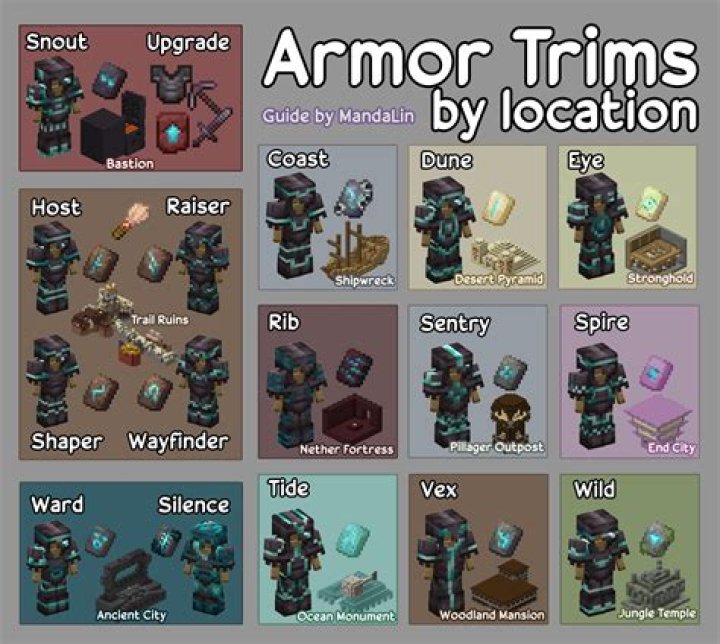
This part lists the locations where you can find Armor Trim Templates and the materials needed to apply them to your armor:
| Armor Trim Template | Template Location/Dropped by | Crafting Material |
| Coast Armor Trim | Shipwreck | Cobblestone x1 Template x1 Diamond x7 |
| Dune Armor Trim | Desert Pyramid | Sandstone x1 Template x1 Diamond x7 |
| Eye Armor Trim | Stronghold | End Stone x1 Template x1 Diamond x7 |
| Rib Armor Trim | Nether Fortress | Netherrack x1 Template x1 Diamond x7 |
| Sentry Armor Trim | Pillage Outpost | Cobblestone x1 Template x1 Diamond x7 |
| Snout Armor Trim | Bastion Remnant | Blackstone x1 Template x1 Diamond x7 |
| Spire Armor Trim | End City | Purpur Block x1 Template x1 Diamond x7 |
| Tide Armor Trim | Ocean Monument Elder Guardian | Prismarine x1 Template x1 Diamond x7 |
| Ward Armor Trim | Ancient City | Cobbled Deepslate x1 Template x1 Diamond x7 |
| Wild Armor Trim | Jungle Temple | Mossy Cobblestone x1 Template x1 Diamond x7 |
| Vex Armor Trim | Woodland Mansion | Cobblestone x1 Template x1 Diamond x7 |
To apply those Armor Trim Templates, you will need a Smithing Table. Place the Smithing Template and the piece of armor you want to change, then use the crafting materials listed above. However, you can replace the Diamond with other ores listed below to change the color of the Trim:
- Iron
- Copper
- Gold
- Lapis
- Emerald
- Diamond
- Netherite
- Redstone
- Amethyst
- Quartz
Minecraft is available on PC, Android, iOS, Xbox One, Xbox Series X|S, Nintendo Switch, and PlayStation platforms.