Learn how to cancel subscriptions that you purchased with an app from the App Store. You can also cancel Apple TV+, Apple News+, Apple Fitness+, and other subscriptions from Apple.
How to cancel a subscription on your iPhone, iPad, or iPod touch
- Open the Settings app.
- Tap your name.
- Tap Subscriptions.
- Tap the subscription that you want to manage. Don’t see the subscription that you’re looking for?
- Tap Cancel Subscription. (Or if you want to cancel Apple One but keep some subscriptions, tap Choose Individual Services.) If you don’t see Cancel, the subscription is already canceled and won’t renew.
Cancel a subscription on your Mac
- Open the App Store app.
- Click the sign-in button or your name at the bottom of the sidebar.
- Click View Information at the top of the window. You might be asked to sign in.
- On the page that appears, scroll until you see Subscriptions, then click Manage.
- Click Edit next to the subscription that you want. Don’t see the subscription that you’re looking for?
- Click Cancel Subscription. If you don’t see Cancel Subscription, then the subscription is already canceled and won’t renew.
Cancel a subscription on your Apple Watch
- On your Apple Watch, open the App Store.
- Scroll to Account and tap it.
- Tap Subscriptions.
- Tap the subscription that you want. Don’t see the subscription that you’re looking for?
- Tap Cancel Subscription. If you don’t see Cancel Subscription, then the subscription is already canceled and won’t renew.
Cancel a subscription on your Apple TV
On Apple TV, you can edit subscriptions only for tvOS apps that are installed on that Apple TV. For Apple TV (3rd generation or earlier), use an iOS or iPadOS device or computer to manage your subscriptions.
- Open Settings.
- Select Users & Accounts, then select your account.
- Select Subscriptions.
- Choose the subscription that you want to manage, then select Cancel Subscription. If you don’t see Cancel Subscription, then the subscription is already canceled and won’t renew.
If you don’t have an Apple device
- You can use a PC to cancel subscriptions from Apple.
- You can cancel Apple Music on the web.
- You can cancel Apple TV+ on the web.
- If you don’t have a PC and you want to cancel a different subscription from Apple, contact Apple Support.
About canceling subscriptions from Apple
- Most subscriptions automatically renew unless you cancel them.
- If you cancel a paid subscription, you can keep using the subscription until the next billing date.
- If you cancel during a free trial period, you might lose access to the subscription immediately.
If you signed up for a free or discounted trial subscription and you don’t want to renew it, cancel it at least 24 hours before the trial ends.
Canceling subscriptions is slightly different in Israel, South Africa, and Turkey. Learn about special circumstances for these countries and regions.
Information about products not manufactured by Apple, or independent websites not controlled or tested by Apple, is provided without recommendation or endorsement. Apple assumes no responsibility with regard to the selection, performance, or use of third-party websites or products. Apple makes no representations regarding third-party website accuracy or reliability. Contact the vendor for additional information.
By admin
Post date
Your BET+ subscription shall be obtainable until the expiration date listed on the gadget. If you do not see an expiration date, verify your Internet connection or attempt checking your different Apple IDs or iOS gadgets earlier than repeating the steps above. Be positive to finalize your request by confirming your cancellation.
Find out how to cancel subscriptions that you simply bought with an app from the App Store. You can also cancel Apple TV+, Apple News+, Apple Fitness+ and different subscriptions from Apple. Learn the way to cancel subscriptions that you simply bought with an app from the App Store.
Apple Tv App
If you’ll be able to’t see Cancel Subscription, the subscription has already been cancelled and won’t be renewed. Or, if you want to cancel Apple One but maintain some subscriptions, faucet Choose Individual Services. If you possibly can’t see Cancel, the subscription has already been cancelled and won’t be renewed.
The subsequent window will ask you to confirm your cancellation. If you’re able to let go, click Cancel Subscription. Scroll down the Settings screen and click on the Manage hyperlink within the Subscriptions section. PCMag editors choose and evaluation products independently.
Canceling Your Subscription Through The Online
The steps for cancelling your subscription are the same whether or not you’re within the midst of the free trial or are already paying for a subscription. If you cancel someday through the trial, there’s no charge. If you cancel throughout a paid subscription, you’re nonetheless charged for the complete month.
The new Apple TV comes with a ton of features including the ability to manage subscriptions right from your device, which you may find more useful than doing so from iTunes.
In the past, we’ve explained how to cancel your Apple Music subscription, which also covers how to cancel others as well. It’s pretty easy but it’s even better if you can just manage subscriptions from the Apple TV itself.
With the newest version of Apple TV running tvOS, you can manage subscriptions right from the device making it a cinch to add or cancel special channels whenever you want.
To get started, first click on the “Settings” tile on the Apple TV home screen.
From the resulting screen, click the “Accounts” option.
On the Accounts screen, scroll to the bottom and click open “Manage Subscriptions…”.
When prompted, use the remote to enter your password and sign into the iTunes Store.
You will see an overview of your subscriptions, and you can click on any one to see further information pertaining to them.
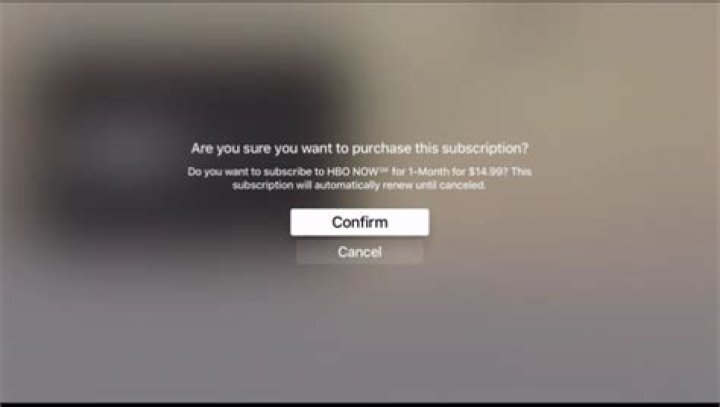
Here in this example, we’re going to sign up for HBO NOW, which renews monthly at $14.99.
When you try to subscribe, you’ll be asked to confirm or cancel.
Once you’ve confirmed your subscription, you’ll be returned to the service’s screen. Note, there’s now a new option you can select. This option will let you turn off automatic renewal, which basically means to cancel. Regardless of when you cancel, you’ll have access to your subscription until the date indicated (December 6th in our example).
When you attempt to turn off automatic renewal, you’ll be once again asked to confirm or cancel. Again, keep in mind that this won’t outright cancel your subscription, you’ll still have access to the service until the date indicated.
You can go through and attend to your other subscriptions as well, such as here with the previously mentioned Apple Music.
Being able to manage subscriptions on the Apple TV is an important feature that will be of great use to many users, particularly those who don’t use iOS devices or Macs, or anyone who simply doesn’t want to deal with iTunes.
We hope you found this article useful, if you have any questions or comments you would like to contribute, please leave your feedback in our discussion forum.
If you are using a MacBook, iPhone or an iPad or any other Apple device, I am sure you have at least one subscription in your Apple ID. Subscription is recurring billing. If you think you need to cancel or change subscription, here is our guide to cancel, manage subscriptions on Apple devices.
The biggest annoyance is that you may get automatically charged for it. We subscribe to offers, and then we forget. What could have happened earlier is:
1] Most of the services you subscribe offer you with the option to renew automatically. Sometimes they even offer discounts for you to do this. So you may have opted because of that, and forgot about it.
2] Some subscriptions offer a discounted or free trial. However, they require you to fill in your credit/debit card details. This is for a reason – If you don’t cancel more than 24 hours before your renewal date, your subscription gets renewed automatically and you are billed for the same, subsequently.
So if you are not planning to remove your Credit Card information from your Apple ID anytime soon, here is what you can do.
How to cancel, manage subscriptions on Apple account
Any Apple device user can change, cancel or manage subscriptions billed through Apple via his iPhone, iPad, iPod touch, Mac or PC. or Apple TV. The interface is almost the same for all of these.
Cancel, manage subscriptions on iPhone, iPad, iPod Touch
1] Tap on ‘Settings’ > [your name] > iTunes & App Store.
2] Here, tap your Apple ID visible at the top of the screen, then tap on the ‘View Apple ID’ link. Sign in with your Apple ID, if prompted.
3] Once done, scroll down to locate ‘Subscriptions’ option under ‘Account Settings’. When found, tap the option.
5] Now, select a subscription you would like to manage.
Here, you can either select a different plan or cancel subscriptions altogether. If you chose the latter option, your subscription will stop at the end of the current billing cycle.
Cancel, manage Apple Music subscriptions through iTunes on your Mac or PC
iTunes lets you purchase everything you need to be entertained. If you are subscribed to Apple Music, you can use iTunes to cancel the subscription.
1] Launch iTunes and sign in with your Apple ID.
2] Next, click View Account. When directed to the Account information page, scroll to the Settings section.
3] There, just adjacent to ‘Subscriptions’ heading (right-side), find ‘Manage’ option and select it.
4] Next, choose ‘Edit’ from the list of options displayed under the menu. Here’ if you notice that you’re being charged for a subscription, but somehow don’t see it in listed under your subscriptions list then, it might be billed through someone other than Apple.
If seen, you can use the options to manage your subscription as earlier i.e., you can either switch to an alternative subscription plan or choose to cancel it.
If you cancel, your subscription will stop at the end of the current billing cycle. You can also cancel subscriptions in the App Store on your Mac.
Cancel, manage subscriptions on Apple TV
Like iPhone and Mac, you can take control of your subscriptions with Apple TV. Besides offering a rapidly expanding catalog of all the leading world TV channels, it comes with a unique ability to manage subscriptions. However, you can only edit subscriptions for tvOS apps that are installed on your Apple TV.
For Apple TV (3rd generation or earlier), you need to use an iOS device or computer to manage your subscriptions. To begin,
1] Open Settings and navigate to ‘Accounts’ section. There, under ‘Subscriptions’ heading, choose ‘Manage Subscriptions’.
2] Choose the subscription that you would like to manage.
3] Again, like earlier, choose a different subscription offering, or select Cancel Subscription to cancel your subscription.
A short tip to add here – If you have the Remote app for iPhone or iPad, try bringing it into use here. We know, typing with the Apple TV remote can get quite burdensome and difficult. As such, an option that makes the job less cumbersome for us should be given a try. If interested, you can get the remote app in the iOS App Store for free.
It’s important that you should always keep an eye your Subscription. Its easy to opt-in, but we always keep forgetting. So make sure to keep checking on it once in a while.
George Tinari
07 Jan 2016
Many different apps in the App Store, especially those related to entertainment on the Apple TV, include the option to subscribe to their services on a weekly or monthly basis. Some examples of apps that feature subscriptions are Netflix, HBO Now, Time Magazine and Apple’s own Apple Music service.
The Apple TV can manage subscriptions across multiple platforms | Photo: Canadapanda / Shutterstock.com
When you sign up for a subscription service in the App Store, nearly every time you’ll enroll in auto-renew, which means that you’ll get billed every billing cycle for the service regardless of whether you use it or not. If you want to manage these subscriptions and options such as auto-renew, you can actually do this directly from your Apple TV.
Tip: You can even see subscriptions on your Apple TV that you signed up for on iOS or Mac as long as you used your iTunes account.
Manage Subscriptions on Apple TV
To manage your service subscriptions on Apple TV, first head to the Settings app on the Home screen.
From here, swipe down and select Accounts.
All the way at the bottom of this screen, choose Manage Subscriptions… under subscriptions. You’ll have to be logged in with your Apple ID, mainly for iTunes and the App Store, before you can proceed from here.
Even if you’re already logged in, you’ll still have to enter your iTunes Store password ahead of time to verify.
Tip: If you have the Remote app for iPhone or iPad, definitely consider using it for this part. Typing with the Apple TV remote is extremely tedious, so you might as well use the keyboard on your smartphone or tablet instead. If you don’t have Apple’s Remote app, you can find it in the iOS App Store for free. It can also control iTunes on your computer.
Once you enter your password, you can see your subscriptions across all devices. Click one to see the options available for that subscription. At the top, it will tell you the status of a subscription and information like what plan you’re on or if the subscription has expired.
Underneath that, you can view renewal options. For instance, with Apple Music, you can change your plan from individual monthly to family monthly, which is an extra $5 per month and expands to family members on your account. You can also choose Turn Off Automatic Renewal to automatically cancel your subscription at the end of the current billing period. If you cancel, subscriptions still show up in this section of the Apple TV for you to renew at any time.
Lastly, on the left side, the terms of your subscription are outlined.
That’s everything you need to manage subscriptions on Apple TV. Don’t forget that you can also manage subscriptions in the Settings menu on iOS and on your account page in iTunes.
Last updated on 8 Feb, 2018
The above article may contain affiliate links which help support Guiding Tech. However, it does not affect our editorial integrity. The content remains unbiased and authentic.
Read Next
6 Best Wireless Earbuds With Ambient Sound Feature
Do you want to stay aware of your surroundings while you go out for your morning jog, or when you are traveling? Say hello to these # wireless # earphones with the ambient # sound feature that will let you do just that.
5 Best DisplayPort Cables With Latches
Computer cables are notorious for loosening over time. Here are the best # DisplayPort cables with latches that will prevent loosening and accidental disconnections. Take a look.
Which Thunderbolt 3 Cable Should You Buy
# Thunderbolt is the future, however, buying a Thunderbolt cable can be quite confusing. Check out these Thunderbolt 3 cables to get the optimum speed during file transfers and phone charging.
Samsung Galaxy Buds Pro vs Sony WF-1000XM3: Which Wireless Earphones Is Better
Should you buy the # Sony WF-1000XM3 instead of the new # Samsung # Galaxy Buds Pro. Read this detailed comparison to see which wireless # earphones are better suited for your needs.
5 Best Braided Thunderbolt 3 Cables That You Can Buy
Get the best possible speed with these highly versatile and durable braided # Thunderbolt 3 cables.
How to Connect Jabra Elite 85t to Laptop, iPhone and MacBook
Bought the # Jabra Elite 85t? Here’s how you can connect it to your Windows # laptop, # iPhone, or your # MacBook Pro.
5 Best Wired Mouse for Office Work
Up your productivity at # work with these high performing wired # mouse for # office # work.
3 Best Webcams With Privacy Shutter
Protect your # privacy with these webcams with privacy shutters to physically block the camera lens when not in use.
Several TV and music services and other apps offer free trials through the App Store that automatically renew to become paid subscriptions after the trial period ends.
If you want to prevent an App Store subscription from running beyond the trial period or cancel a subscription you’re currently paying for, then read on. This article explains how to cancel any App Store subscription on iOS, Mac, and Apple TV.
How to Cancel App Store Subscriptions on iOS
- Open Settings on your iPhone or iPad.
- Tap iTunes & App Store.
- Tap your Apple ID at the top, shown in blue.
How to Cancel App Store Subscriptions on Mac
- Launch the iTunes application.
Enter your Apple ID login credentials if requested.
In the Settings section, click Manage next to Subscriptions.
In the Active Subscriptions section, click Edit next to the subscription that you want to cancel.
How to Cancel Subscriptions on Apple TV
- Open Settings on your Apple TV.
Select Accounts.
Select Manage Subscriptions.
Choose the subscription that you want to end.
Select Cancel Subscription.
How to Change a Subscription or Re-subscribe to a Canceled Service
Apple keeps a record of your subscription history, which makes it easy to re-subscribe to a service you previously canceled. (Note that after re-subscribing to a service, your subscription will automatically renew until you cancel it again.) You can also change an existing subscription from the same screens. The following steps relate to iOS.
- Open Settings on your iPhone or iPad.
- Tap iTunes & App Store.
- Tap your Apple ID at the top, shown in blue.
- Tap View Apple ID in the pop-up.
- Sign into the iTunes Store using your login credentials or Touch ID/Face ID if requested.
- Tap Subscriptions.
How to Change or Re-subscribe to a Service on Mac
- Launch the iTunes application.
Enter your Apple ID login credentials if requested.
If you try out an app on Apple TV that feature a subscription, like HBO Now or CBS All Access, and decide you don’t like it, it’s easy to cancel on your iPhone, iPad, or on your Mac or Windows PC via iTunes. If you simply want to change your subscription options, however, you can do that right on your Apple TV.
How to manage subscriptions on Apple TV
- Open the Settings app.
Select Accounts.
Enter the password associated with your Apple ID.
When asked to confirm the changes, select Confirm.
How to cancel subscriptions you started on Apple TV
If you signed up for HOB Now or Daily Burn, or any other subscription service, and want to cancel it, you’ll have to turn off automatic renewal from your iPhone or iPad, or via iTunes on your Mac or Windows PC.
How to cancel via iPhone or iPad
- Open the Settings app.
Tap iTunes & App Store.
Enter the password associated with your Apple ID and tap OK.
Choose a subscription.
Tap Turn off to confirm.
How to cancel via iTunes on Mac or Windows
- Open iTunes.
Select your Profile on the upper right side of the iTunes window.
Click View Account.
Find the subscription you wish to change and click Edit.
Click Turn off to confirm.
Any Questions?
Do you have more questions about how to manage subscriptions on Apple TV or turn off auto-renewal? Post them in the comments section and we’ll try to help.
By admin
Post date
Your BET+ subscription shall be obtainable until the expiration date listed on the gadget. If you do not see an expiration date, verify your Internet connection or attempt checking your different Apple IDs or iOS gadgets earlier than repeating the steps above. Be positive to finalize your request by confirming your cancellation.
Find out how to cancel subscriptions that you simply bought with an app from the App Store. You can also cancel Apple TV+, Apple News+, Apple Fitness+ and different subscriptions from Apple. Learn the way to cancel subscriptions that you simply bought with an app from the App Store.
Apple Tv App
If you’ll be able to’t see Cancel Subscription, the subscription has already been cancelled and won’t be renewed. Or, if you want to cancel Apple One but maintain some subscriptions, faucet Choose Individual Services. If you possibly can’t see Cancel, the subscription has already been cancelled and won’t be renewed.
The subsequent window will ask you to confirm your cancellation. If you’re able to let go, click Cancel Subscription. Scroll down the Settings screen and click on the Manage hyperlink within the Subscriptions section. PCMag editors choose and evaluation products independently.
Canceling Your Subscription Through The Online
The steps for cancelling your subscription are the same whether or not you’re within the midst of the free trial or are already paying for a subscription. If you cancel someday through the trial, there’s no charge. If you cancel throughout a paid subscription, you’re nonetheless charged for the complete month.
All Apple Originals.
Only on Apple TV+.
Watch on the app
- New Apple Originals every month.
- Stream on the Apple TV app on Apple devices, smart TVs, consoles, or sticks.
- Share Apple TV+ with your family.
Buy an Apple device
Get 1 year on us
Apple TV+ is included for 1 year when you purchase an Apple device and redeem the offer within 90 days. 1
Free 7-day trial
$4.99/mo.
A monthly subscription is just $4.99 per month after a free 7-day trial. Share Apple TV+ with your family. 2
Free 1‑month trial
Apple One
Bundle Apple TV+ with up to five other great services for one low monthly price. And enjoy more for less. Learn more
Watch Apple TV+ anywhere
on the Apple TV app.
Find the Apple TV app everywhere from Apple devices to smart TVs. Or watch online at tv.apple.com.
Apple TV
iPhone
AirPlay
Playstation
Fire TV
Google TV
Samsung Smart TV
LG Smart TV
Vizio
In case you
missed anything.
What is Apple TV+?
Open to read more about What is Apple TV+? Close
Apple TV+ is a streaming service featuring Apple Originals — award-winning series, compelling dramas, groundbreaking documentaries, kids’ entertainment, comedies, and more — with new Apple Originals added every month.
How can I watch it?
Open to read more about How can I watch it? Close
Watch Apple TV+ on the Apple TV app, which is already on your favorite Apple devices. Just open the app, click or tap Apple TV+, and enjoy the shows and movies. You can also watch Apple TV+ on streaming platforms, popular smart TVs, and AirPlay-enabled TVs with the Apple TV app — or watch online at tv.apple.com.
What does it cost?
Open to read more about What does it cost? Close
That all depends on which offer you choose. (1) If you buy an Apple device, Apple TV+ is included free for one year. 1 (2) A monthly subscription is just $4.99 per month after a free seven-day trial. 2 (3) Apple TV+ is included in Apple One, which bundles up to five other Apple services into a single monthly subscription. Apple One plans start at $14.95 per month. (4) The Apple Music Student Plan comes with a free subscription to Apple TV+. 3
Can I share with my family?
Open to read more about Can I share with my family? Close
Of course. Apple TV+ lets you share your subscription with up to five family members.
Are there commercials? And can I watch on demand?
Open to read more about Are there commercials? And can I watch on demand? Close
Apple TV+ is always commercial-free. Some shows release all episodes at once. Other shows add new episodes every Friday. You can then watch them on demand anytime, anywhere.
Do I need an Apple TV 4K?
Open to read more about Do I need an Apple TV 4K? Close
No, you don’t. While Apple TV 4K — with 4K HDR and Dolby Atmos sound — is the ultimate way to experience Apple TV+, the original shows and movies on Apple TV+ are always available on the Apple TV app on your favorite devices.
Can I download to watch offline?
Open to read more about Can I download to watch offline? Close
Absolutely. Download your favorite Apple Originals to your Apple device and watch them anywhere, anytime without a Wi-Fi connection.
Apple One
Bundle Apple TV+
with
up to five other great services.
And enjoy more for less.
The Apple Music Student
Plan comes with
Apple TV+ for free. 3
Apple TV 4K
The ultimate way to
watch Apple TV+.
AirPlay
Bring Apple TV+ to
a screen near you.