A file with the .RTF file extension is a Rich Text Format file. While a normal text file stores only plain text, RTF files can include extra information about font style, formatting, images, and more. They are great for cross-platform document sharing because they are supported by lots of apps.
What Is an RTF File?
RTF was created by the Microsoft Word team back in the 1980’s. It was intended as a universal format that could be used by most word processors, making it easier for people to share Word documents with people who don’t use Word. It was also incorporated as the default format used by Windows’ built-in WordPad app—a lightweight word processor.
Before they were superseded by HTML files, RTF was also used as the basis for the Windows help files.
With most word processors being able to read and write an RTF file, this means if you create one on Windows, then you’ll be able to send it to a colleague who uses macOS, or Linux, without encountering any problems. It’s also widely used in other types of apps, such as email clients.
Microsoft discontinued the development of RTF in 2008, but it’s still widely supported by apps on almost every operating system.
How Do I Open An RTF File?
The first thing to try is just double-clicking (or tapping on mobile) to open the RTF file directly.
You almost certainly have an app already built-in or installed on your system for opening RTF files. To start with, if you’ve got any word processing app installed—Microsoft Word, LibreOffice, OpenOffice, AbiWord, and so on—you can open an RTF file with it.
Most file syncing services—like Dropbox, OneDrive, and Google Drive—have built in viewers that let you at least read an RTF file, even if you can’t edit there. Google Docs does let you edit RTF files, though.
And most operating systems have a built-in editor that can open RTF files. In Windows, that’s WordPad. In macOS, you can use Apple TextEdit or Apple Pages. And unless you’ve installed something else (like Microsoft Word), those apps will be the default for opening RTF files. For example, even on a fresh install of Windows, double-clicking an RTF files opens it right up in WordPad.
Note: And while there’s not a built-in RTF editor in most Linux distros, you can certainly install something like LibreOffice.
If you prefer that RTF files open with a different app than the one currently set as the default, that’s easy enough. On Windows or macOS, just right-click the file and you’ll see an “Open With” command or something similar for picking the app you want to use.
Here’s the window that pops up when you do that in Windows (macOS is similar). It shows a list of apps that can open RTF files. Just pick the one you want to use. And you can select the “Always use this app to open .rtf files” option to have that app become the default.
How To Convert an RTF File
While many applications support RTF files, you might want to convert them to something else. You can’t just change a file’s extension to do that—you have to convert the file. Typically, you’re going to want to convert it to the format used by your word processor. The easiest way to do that is to open the RTF file in that app, and then use that app to save it in a different format.
For example, if you open your RTF file in Microsoft Word, and then use the Save As command, you’ll come to the Save As dialog box. You can then use the “Save As Type” dropdown menu to choose from a bunch of different formats.
If you don’t have a full word processor installed, you can also try whatever comes with your OS. The WordPad Save As window, for example, doesn’t offer as many formats as Microsoft Word does, but there are still a few useful ones.
Convert RTF to PDF – online and free – this page also contains information on the RTF and PDF file extensions.
❯
How to convert a RTF to a PDF file?
- Choose the RTF file that you want to convert.
- Select PDF as the the format you want to convert your RTF file to.
- Click “Convert” to convert your RTF file.
Zamzar Pro Tip: You can use Microsoft Office, Libre Office or if you own a Mac you can use Pages to open RTF files.
Drag & drop files, or select link
Max. file size 50MB (want more?)
Or choose a different format
(And agree to our Terms)
Email when done?
Drop your files to convert them
We’ll get right on it
Files to Convert
Overall conversion/upload progress:
| File Name | File Size | Progress |
|---|
| File extension | .rtf |
| Category | Document File |
| Description | Rich Text Format (RTF) is a file format that enables you to write a text file, save it on one operating system and then have the ability to open it on another. You cannot add images or objects – it is purely aimed at text. You can create a file using Microsoft Word in Windows, save it as an RTF file (it will have a .rtf file name suffix), and send it to someone who uses WordPerfect 6.0 on any version of Windows and they will be able to open the file and read it. Most people would have seen it when writing a ‘wordpad rtf’ file. |
| Actions | RTF to PDF – Convert file now View other document file formats |
| Technical Details | The RTF Specification uses the ANSI, PC-8, Macintosh, and IBM PC character sets. It defines control words and symbols that serve as common denominator formatting commands. When saving a file in the Rich Text Format, the file is processed by an RTF writer that converts the word processor’s markup to the RTF language. When being read, the control words and symbols are processed by an RTF reader that converts the RTF language into formatting for the word processor that will display the document. |
| Associated programs | AbiWord Kword Microsoft Word TextEdit WordPad |
| Developed by | Microsoft |
| MIME type | text/rtf |
| Useful links | More detailed information on RTF files What free programs can I use to open an RTF file ? Convert RTF file |
| File extension | |
| Category | Document File |
| Description | PDF is a file format developed by Adobe Systems for representing documents in a manner that is separate from the original operating system, application or hardware from where it was originally created. A PDF file can be any length, contain any number of fonts and images and is designed to enable the creation and transfer of printer-ready output. |
| Actions | Convert PDF file View other document file formats |
| Technical Details | Each PDF file encapsulates a complete description of a 2D document (and, with the advent of Acrobat 3D, embedded 3D documents) that includes the text, fonts, images and 2D vector graphics that compose the document. They do not encode information that is specific to the application software, hardware, or operating system used to create or view the document. |
| Associated programs | Adobe Viewer Ghostscript Ghostview Xpdf gPDF |
| Developed by | Adobe Systems |
| MIME type | application/pdf |
| Useful links | Adobe Reader (to view) Adobe Acrobat (to edit) Convert PDF file |
Convert RTF file
Using Zamzar it is possible to convert RTF files to a variety of other formats
- rtf to doc (Microsoft Word Document)
- rtf to pcx (Paintbrush Bitmap Image)
- rtf to pdf (Portable Document Format)
- rtf to png (Portable Network Graphic)
- rtf to ps (PostScript)
Converting an RTF to PDF is easy with this economical PDF creation software. Simple to use with many built-in features, PDF Creator Plus is a complete solution for converting not only your rich text files (RTF) to PDF but also any file from a Windows application that can print.
Why Convert RTF to PDF with PDF Creator Plus?
- Easily merge multiple RTF files into a single PDF
- Preview, add, organize and delete unwanted pages before creating your PDF
- More than just PDF, PDF Creator Plus can also create TIFF, JPEG and BMP images
How to Convert RTF to PDF
- Download your free trial and install PDF Creator Plus on your computer. As a virtual printer, PDF Creator Plus can create PDF files by simply printing to PDF Creator Plus instead of your normal printer.
- Type in a name for your new PDF document and choose where to save it.
- Select PDF file(*.pdf) as the Save as type and ensure the Create Multipaged File, Embed Fonts, Include Outline and Include Hyperlinks options are checked.
- Click the Save button to convert your RTF to PDF.
Questions and answers
RTF stands for Rich Text Format and is a universal document file format and is easily read by many of the word-processing packages. It is particularly useful to those using a different word-processing package from those used on campus.
To save a file as RTF
- Open the Word document
- From the File button, choose Save As from the menu
- Rename the file if desired
- Click on the Save As type choice button
- Scroll down the list of file types to Rich Text Format (*.rtf)
- Click Save.
To open an RTF file
- From the File button, choose Open from the menu
- Choose All files (*.*) from the Files of type Box
- Select the file
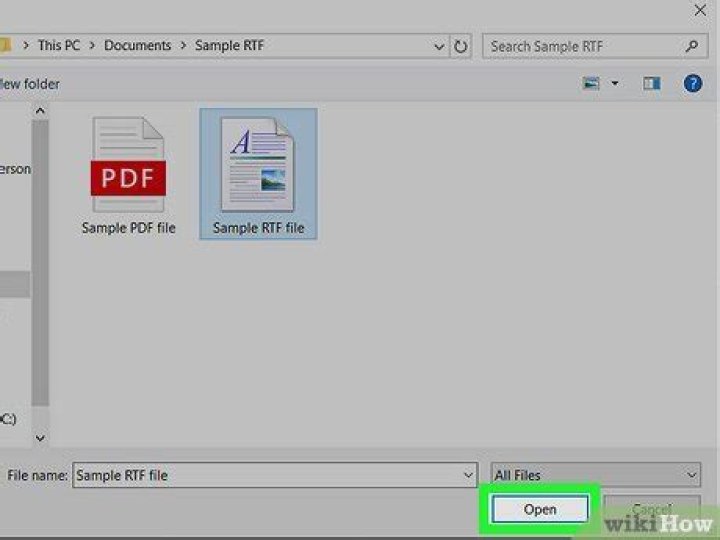
- Click on Open
- Click OK to any messages about conversion
Help us to improve this answer
Please suggest an improvement
(login needed, link opens in new window)
Your views are welcome and will help other readers of this page.
Categories
This is question number 818, which appears in the following categories:
Created by Jason Bailey on 27 July 2001 and last updated by Adrian Chorlton on 1 August 2016
Copyright © 2020, University of Sussex
- A-Z |
- Staff search |
- Contact us |
- Email |
- External website |
- Privacy |
- Cookies
File extension RTF is most commonly associated with a Rich Text Format file, which is a format developed by Microsoft in the late 1980’s for the transfer of formatted text documents between different platforms. The RTF file format is still owned and developed by Microsoft, with the latest version, 1.9.1, released in March 2008.
RTF files primarily contain text with additional control codes which identify the file type and also indicate formatting features to an application used to open it. RTF files can contain a variety of formatting, including emboldened, italic and underlined text, fonts and font sizes, paragraphs, text justification, bullet points, text colours and tab spaces. It is also possible to embed objects, such as images or PDF files, in packages within RTF files, which can then be activated and viewed using an appropriate application.
Though RTF files do not support many of the features of more advanced word processed document formats such as DOC, they are stored in ASCII format rather than binary. This means that they are human-readable if opened with a simple text editor as any content is stored in plaintext with any formatting indicated by control codes, which are prefixed by a backslash (), or groups which are stored within braces (). Though characters in RTF files are stored using 8 bits which would traditionally only allow the use of ASCII, code page and Unicode escape characters allow a much wider range of characters to be stored.
As RTF files can contain embedded objects stored in packages, it is possible that they contain malicious software such as viruses or spyware so should be checked with anti virus software before opening, particularly if the source of the file is unknown.
RTF files were developed to be cross-platform compatible, meaning that they can be transferred between a wide range of applications on Windows, Mac and UNIX-based platforms. RTF files can be opened using most word processors such as Microsoft Word, WordPad, OpenOffice.org Writer and Corel WordPerfect, or with the majority of text editing applications.
Open RTF File on Windows OS
- Find a RTF file in question in Windows File Explorer and double click on it.
- If a file is not opened in an application and you instead get a “Windows can’t open a file” error message you should try looking for an application which can open the RTF file in question.
- If you know the application which can open RTF file then run it and see if there is a File->Open option in the application main menu.
- If you don’t know the application which can open RTF file then try to search for “RTF wiki”, “application to open RTF file” or “RTF file” queries in the search engine you like.
- Install the application you found and check if it can open RTF file
Rate this page: 5 4 3 2 1 4 / 5 based on 6 ratings
Populating this website with information and maintaining it is an ongoing process. We always welcome feedback and questions that can be submitted by visiting Contact Us page. However since there are many users visiting this website and because our team is quite small we may not be able to follow up personally on every request. Thank you for your understanding.
Open RTF file article translations
For more general information about how to open RTF files, file extension rtf and registry you can read one of the following articles:
- Windows registry – Windows registry is included in modern Windows operating systems to replace the older INI files which also contained system configuration. Let’s concentrate on the structure and purpose of Windows System Registry, review some possible attacks to it and ways to avoid them.
- Folders, files and paths – Files are the entries or information stored on your computer. These are represented by binary coding and written on the tracks on a disk. Files are often represented by distinct icons, a normal practice done by Microsoft with their products including system files for their series of operating systems.
- What are file extensions? – File extensions are unnoticed yet are very crucial parts of the computer world. But many are still unaware of the basic foundation and principles behind the remarkable wonders of computers.
Download CorelDRAW to open your file now.
A full 15-Day free trial of this graphic software. No credit card required.
What is a RTF File?
RTF or Rich Text Format is a document file format developed by Microsoft. This publicly specified format is mostly used for interchanging documents between Microsoft Products and other applications. The first version of RTF format was introduced in 1987 and since then, there have been a lot of updates in this format. RTF files are supported in all kind of document processing applications. But newer versions of RTF files may have compatibility issues with older applications. The latest version of CorelDRAW supports all versions of RTF files.
How to open RTF files with CorelDRAW
- Launch CorelDRAW
- Choose File > Open
- Find the RTF file you wish to open
- Select the File(s)
- Edit & Save Your File!
Open RTF files on Windows
- Compatible with:
- Windows 10
- Windows 8
- Windows 7
Open RTF files on Mac
- Compatible with:
- macOS 10.14
- macOS 10.13
- macOS 10.12
CorelDRAW Opens RTF Files and many more file formats
We designed CorelDRAW Graphics Suite to open a wide range of file format, including all of the following:
- eps
- svg
- png
- psd
- ai
- tif
- dxf
- dwg
- rtf
- pub (Windows only)
- bmp
- ico
- exe (Windows only)
- gif
- vsd
- jpg
- dng
- docx (Windows only)
- ps
- prn
- htm
- doc (Windows only)
by Zubair Alexander · Published April 18, 2019
In Windows 10, by default the .rtf file extension is associated with Microsoft Word. If you want to associate it with WordPad, so that when you double-click a file with .rtf extension it always opens in WordPad, here’s an easy way to accomplish your goal.
- Right-click a blank area in File Explorer or Windows 10 desktop, select New -> Rich Text Format, and then press ENTER. You just created a blank .rtf file. If you have an existing document that’s currently associated with Word, but you prefer to open it in WordPad, you can skip this step and go to the next step 2. I find it quicker to just create a blank WordPad file and then delete it when I have associated .rtf files with WordPad.
- Right-click the newly created file and select Open with…, which will bring up the How do you want to open this file? window.
- Click the blue More apps hyperlink and from the list of apps select WordPad, as shown below. Also, check the box Always use this app to open .rtf files.
- Click OK.
- Delete the empty WordPad file because you created in step 1 because you don’t need it anymore.
Now when you open a file with .rtf extension it will always open in WordPad.
| Thanks for reading my article. If you are interested in IT training & consulting services, please reach out to me. Visit ZubairAlexander.com for information on my professional background. |
Copyright © 2019 SeattlePro Enterprises, LLC. All rights reserved.
Quick Navigation :
An Overview of Rich Text Format (RTF)
What is rtf? The RTF, short for rich text format, was released by Microsoft in 1987. The purpose of creating the rtf file is to make the cross-platform document interchanging as reality. The majority of word process programs that are applied at present can read this format without any issues.
Since, it is a cross-platform document, it allows you to open am rtf file on other operating systems besides the one that you build the file. For instance, you build a rtf file on Windows OS, but you can open this file on a MacOS, or Linux device after you sends it to the device. It is also widely used in many other kinds of applications like email clients.
What makes the rtf format different from other text formats? MiniTool will show you in the following content.
You can only store the plain text with a normal text file, while you are allowed to store different formatting such as italics, bold, fonts, sizes, and images with a rtf file. This feature makes rtf unique over other text formats.
The rtf even becomes the default format for Microsoft WordPad. In addition, rtf files were used as the basis of Windows help files before they were replaced by HTML files. However, Microsoft stopped updating rtf since 2008.
Even so, this text format is still supported by applications on almost every operating system. So, you can continue running your rtf files on older or other platforms. If you lose or delete this sort of files, you can recover them easily with MiniTool Power Data Recovery Software.
How to Open RTF Files on Windows 10
It is rather easy to open rtf files. Here are multiple ways to open rtf files on Windows 10 or on other operating systems. The first method you can try is to simply double-click or tap on mobile to open your rtf files.
If you have any built-in or installed applications like WordPad on your operating system, you can use them to open rtf files on your device. Certainly, you can also open rtf files with other text editors or word processors.
For instance, you can use LibreOffice, OpenOffice, AbleWord, WPS Office and SoftMaker FreeOffice to open the rtf file. Most file syncing services like Dropbox, OneDrive and Google Drive allow you open your rtf files through their built-in viewers. But you cannot edit rtf files with these services.
If you would like to edit and open rtf file online, Google Docs and Zoho Docs can be of great help.
How to Convert RTF Files to Other File Formats
Though rtf files are supported by plenty of applications and operating systems, you may still want to convert them to other text forms. One of the most common conversions is rtf file to pdf. You can convert rtf file to any formats that are used by your word processor.
The conversion requires you convert the file truly so you can’t simply change its file extension to do that. The easiest and most simply way convert rtf file is to open the file in an app, and then save the file in the target format via the application.
Alternatively, you can also convert your rtf files via an online RTF converter like FileZigZag. This converter enables you to convert your rtf file to a DOC, PDF, TXT, ODT, or HTMLfile. There are some other rtf converters for you like Zamzar and Doxillion.
These converters can help you convert your rtf files to different text formats. In a word, the rtf file can be converted to other text formats easily. You can pick one based on your demand.
You must be eager to recover PDF file rather than rewriting a new one if lost PDF file contains a lot of significant information.
The Bottom Line
What is rich text format? How to open rtf file? How to convert rtf format file to other formats? Read here, you may have answers to these questions. In fact, you will have a comprehensive understanding of rtf files after reading the post. If you are going to convert your rtf files, you can do that job easily with the programs given in this post.
Products
MiniTool Library
Hot IT Solutions
Support
Join for Exclusives
North America, Canada, Unit 170 – 422, Richards Street, Vancouver, British Columbia, V6B 2Z4
Asia, Hong Kong, Suite 820,8/F., Ocean Centre, Harbour City, 5 Canton Road, Tsim Sha Tsui, Kowloon
Copyright © 2020 MiniTool ® Software Limited, All Rights Reserved.
How to open, edit, and convert WPD files
- Tweet
- Share
A file with the .WPD file extension is a text document. What kind of text file it is depends on the program that’s using it; there are three main file formats that utilize this file extension.
The most likely scenario is that you have a WordPerfect Document file, which is a WPD file that was created by Corel’s WordPerfect application. It might have tables, text, images, and other objects stored within the file.
The Swiftpage Act! contact management software (previously known as Sage ACT!) uses WPD files, too, and it most likely is truly text-only (no images or other objects).
602Text is another program that can make WPD files. It creates what’s called a Document file (much like WordPerfect) that might contain anything a regular word processor created document supports, like tables, custom formatting, images, text, footnotes, form objects, etc.
WPD is also short for some technology terms that have nothing to do with a file format, such as web page development and Windows portable device.
How to Open a WPD File
WordPerfect is the primary program associated with WordPerfect Document files, so you can use that application to open the file. However, you can open that kind of WPD file with LibreOffice Writer, FreeOffice TextMaker, Microsoft Word, and Canvas X as well. NeoOffice can open them on a Mac.
The LibreOffice and FreeOffice programs can open and edit the file but then you have to choose a different document file format to save it to when you’re done, like DOCX or DOC.
The Act! program from Swiftpage can open a WPD file that’s in that format.
The third application that creates these files is called 602Text, which is part of the 602Pro PC Suite program from Software602. However, the final version was last released in the early 2000s, so there isn’t a current download link available. You can still get it through Archive.org.
The 602Text Document file format was developed to be compatible with Microsoft Word, so some versions of MS Word might support the format, too. However, it might not render images correctly and would probably only be useful if the majority of the WPD file is text-based (in which case you could even use a text editor).
How to Convert WPD Files
Since there are three file formats to consider, you need to know which one your file is in before deciding how to convert it. Even though two of them (WordPerfect and 602Text) are similar in that they’re both documents used by word processors, you need to use a separate converter for each.
For WordPerfect files, convert the WPD file to DOC, DOCX, PDF, PNG, TXT, ODT, etc., with Zamzar. It’s an online converter, so you can use it without installing any extra software to your computer; just upload the WPD file, choose a conversion type, and then download the converted file back to your computer.
Doxillion is another WPD converter for the WordPerfect file format but it’s an actual program you have to install.
Use 602Text through the link above to convert a WPD file in that format. Use the File > Save As menu to convert it to a template file with the WPT file extension, or to DOC, HTML/HTM, CSS, RTF, PDB, PRC, or TXT.
If an Act! WPD file is able to be converted to any other format, it’s most likely accomplished through the Act! program itself. Open the file there and try an Export or Save As menu to see which formats, if any, the file can be saved to.
If after you convert the WPD file with one of these tools, you need it to be in a different file format that isn’t supported there, consider running it through a free file converter. For example, to convert a WordPerfect file to JPG, you can use Zamzar to first save it to PNG, and then convert the PNG to JPG with an image file converter.
Still Can’t Open the File?
The first thing to check for if you can’t open your WPD file is that you’re using the correct program. 602Text should not be used to open WordPerfect Document files, and neither should the reverse be tried.
Are you for sure opening the file in the right program but it’s still not working? Maybe you’re not actually dealing with a WPD file. Some file formats use file extensions spelled very much like this one but have nothing to do with any of the formats mentioned above.
For example, WDP files look very similar but are used for the Windows Media Photo and AutoCAD Electrical Project file formats, meaning that they only work with image viewing applications or, in the case of the latter, Autodesk’s AutoCAD software.
ADP is another example that could be confused for this file extension.
If you find that you don’t actually have a WPD file, research the file extension that you do have, and you’ll find which programs can open and convert that particular file.
RTF, short for Rich Text Format, is a proprietary file format developed by Microsoft Corporation since 1987 for Microsoft products like Microsoft WordPad and for cross-platform document interchange.
RTF file format supports several types of text formatting, such as customized fonts and font sizes, bold, italics, etc. It can also include images in the formats of JPEG, PNG, Enhanced Metafile (EMF), Windows Metafile (WMF), Apple PICT, Windows Device Independent bitmap and so on.
RTF Frequently Asked Questions
How to select a program to open RTF files?
When you double click RTF files on computer, the associated program will be launched to open the selected RTF file. But you can change it to any program at your pleasure.
a) Select a program to open RTF files on Windows
Right-click on the RTF file and go through ‘Open with’ > ‘Choose default program’. In the pop-up windows, choose a program as the RTF file opener. If you decide to always open RTF files with the program, only check the option ‘Always use the selected program to open this kind of file‘.
b) Select another application to open RTF files on Mac
First Get Info about any one of RTF files by right-clicking or Command-I, and click ‘Open with’ arrow to choose a program to start your RTF file. Click ‘Change All’ button to set the selected application as the default RTF file opener app.
User community support forum for Apache OpenOffice, LibreOffice and all the OpenOffice.org derivatives
- Board index‹Applications‹Writer
- Change font size
- Print view
- FAQ
- Register
- Login
[Solved] How do i open an .rtf-file?
[Solved] How do i open an .rtf-file?
by bopet » Thu Jan 03, 2013 1:00 pm
Re: How do i open an .rtf-file?
by RoryOF » Thu Jan 03, 2013 1:03 pm
Re: How do i open an .rtf-file?
by Mr.Dandy » Thu Jan 03, 2013 1:05 pm
Maybe you must upgrade your version with 3.4.1
Re: How do i open an .rtf-file?
by bopet » Thu Jan 03, 2013 1:19 pm
Re: How do i open an .rtf-file?
by Hagar Delest » Thu Jan 03, 2013 3:06 pm
Re: How do i open an .rtf-file?
by bopet » Thu Jan 03, 2013 3:22 pm
Re: How do i open an .rtf-file?
by Mr.Dandy » Thu Jan 03, 2013 4:37 pm
Re: How do i open an .rtf-file?
by bopet » Fri Jan 04, 2013 12:51 pm
That´s really strange, it opens as an .rtf but saves as an .ods with only similar types of files to choose from. I can open it with wordpad but it comes up as mumbo-jumbo, just a bunch of signs.
Let me add that i´m useless when it comes to computers, but i´m a first-grade cabinet-maker . It´s of little use in this specific case.
Re: How do i open an .rtf-file?
by Hagar Delest » Fri Jan 04, 2013 1:06 pm
Re: How do i open an .rtf-file?
by bopet » Fri Jan 04, 2013 2:14 pm
Re: How do i open an .rtf-file?
by Hagar Delest » Fri Jan 04, 2013 3:15 pm
But that’s an ods file, not an RTF. I thought your application produced RTF files.
If you need a text document, then copy the cells and paste as formatted text for example in a Writer document.
Please add ‘[Solved]’ at the beginning of your first post title ( edit button) if your issue has been fixed.
Re: How do i open an .rtf-file?
by bopet » Fri Jan 04, 2013 3:33 pm