This article will give readers seven tips to prevent mobile charger cables from breaking and an explanation about why they're easily broken.
- POCO X2 vs POCO F2 Pro: Reasons Why POCO X2 Is A Better Choice
- Samsung Galaxy M12 Debuts In India With 90Hz Display & 48MP Quad Cam
- Realme C12 Review: Refreshing Design, Massive Battery, Decent Cameras
“They don’t make things like they used to.” And phone charger cables are the best examples to illustrate this old saying.
This article will reveal some easy methods to prolong your charger cables’ life.
It must be extremely annoying when you find out that the charger cord has been broken, especially when you have just purchased it from the store. These broken charger cords, however, may be very dangerous as the system of wires inside will be revealed, increasing your chance of getting an electric shock.
These broken charger cords may be very dangerous as the system of wires inside will be revealed, increasing your chance of getting an electric shock.
Therefore, in order to prevent it from happening, below are some tips that will help you to protect the charger cord.
1. Look after them carefully – Hold the cable’s plug element when you’re removing it. Do not bend the cable too close to its ends. And you should consider using a wallet or some kind of protective case to keep your cable when you’re not using it.
2. Buy cable protectors – Cable protectors help protect the point where the cord is connected to the metal or plastic plug.
3. Buy magnetic adapters – Magnetic adaptors are the complete solution to the problem, unlike usual cables.
4. Utilize a spring– A spring is an old but very effective trick. Wrap a spring around your cable so it won’t be broken.
5. Utilize electrical tape– Electrical tape is another simple and cheap way to protect your cable. You just need to wrap it around the point where the cable is connected to the plug.
6. Heat shrink them– Shrinking the tube using heat is an easy method to prolong the life of your cable.
7. Utilize paracord bracelets– If you are using a charger cord from iPhone, which is famous for its fragility, you can consider reusing one paracord bracelet in order to strengthen your cable.
Normally, those detailed tips above are enough for you to protect your iPhone cable; however, there’re other tips you can utilize to strengthen those that are suspiciously designed.
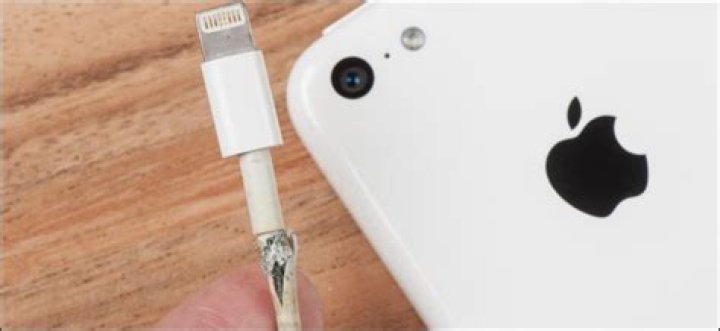
iPhone’s charger cable.
What you should consider most is that throughout the lifetime of these cables, they do receive much wear. As a result, the first thing you can do to protect your cable is to look after them right from the start.
In addition to the use of electric tape, old springs, and paracord bracelets, you can take a charger cord from the iPhone that has been reinforced into consideration.
It’s expected that this handy little accessory will be more useful in preventing your cable from fraying than the normal cases. Normally, you will not regret investing in this accessory.
Or you can find some other solutions related to wireless charging, instead of using the charger cord.
Skeptical people may think that it’s the design that makes charger cables break very easily; however, in fact, the true reasons are different.
– People have a tendency to use and move their phone many times, unlike other electrical devices. This puts their charger cable under strain and stress, resulting in its higher possibility of being broken.
– The appearance of cables for mobile phones is quite thin and small. Therefore, they’re inherently delicate.
– People often carry charger cables for their mobile phones around. This is another reason why they are likely to be worn and torn.
If you suffer from “phone charger breaking syndrome,” then you might want to use some of these tips.
“They don’t make things like they used to,” so the old saying goes. Never before has this been truer than for phone charger cables.
Whether they are inherently designed to be “just good enough” or simply take a beating, here are some simple solutions to extend the life of your charger cables.
How do I keep my charger cord from breaking?
There is nothing more frustrating than your charger cord breaking – especially if it is relatively new. But they can also be potentially dangerous as frayed cables expose the wiring inside which could, potentially, increase the risk of an electric shock.
So, with that being said, here are a few things you can do to help preserve the integrity of your charger cord.
1. Take proper care of them – Always hold the plug element of the cable when removing it, don’t bend it too near the ends (or at all if you can help it), and consider keeping it in some kind of wallet or other protective cases when not in use.
2. Consider cable protectors – Cable protectors work by protecting the point at which the cable joins the plastic or metal plug.
3. Consider getting yourself magnetic adapters – Completely avoid the problem by using magnetic adaptors instead of more traditional cables.
4. Use a spring – This is an older trick but is very effective. Sheath your cable in an old spring to help protect them.
5. Use electrical tape – Another cheap and simple method is to wrap electrical tape around the ends of the cord that meet the plug.
6. Heat shrink them – Heat shrink tubing is another simple way to strengthen your charger cables.
7. Use paracord bracelets – For your notoriously fragile iPhone charger cable, why not consider repurposing a paracord bracelet to provide some added strength?
How do you keep your iPhone charger from breaking?
Many of the tips detailed above work very well for iPhone chargers in particular, but there are some other things you can do for those suspiciously designed iPhone charger cables.
The main thing to consider is that these cables really do receive a lot of wear over their lifetimes. For this reason, your first line of defense is to take good care of them from the beginning.
Good use of old springs, paracord bracelets and electric tape aside, you might want to consider getting yourself a reinforced iPhone charger cord.
These handy little accessories are much more resistant to fraying than standard cables and tend to be worth the investment.
Alternatively, you could dispense with the charger cable altogether and get your hands on some wireless charging solutions.
Why do phone chargers break so easily?
The more skeptical amongst you may suspect that they break so easily by design, but there are actually some other, less nefarious, reasons why.
It’s a fact of life. Cables break, usually at the worst times possible. However, these easy steps can breathe some extra life into your most commonly used cables.
Cables often fray, but there are easy ways to keep them together a bit longer.
Most cables get plugged in and left alone for years at a time. All those power and HDMI cables connecting your home entertainment system together rarely get touched. The cables meticulously organized at your work desk may as well be cemented in place.
But the cables we use everyday — the computer and smartphone chargers — go through hell. They get twisted, yanked and bent on a daily basis, and they’re bound to fail at some point.
If one of your cables is beginning to fray, you can counteract the damage with one of these quick fixes.
Electrical tape
One of the most cost-effective fixes for a cable that’s about to meet its end is a bit of electrical tape. It’s not going to be pretty and it won’t be the most secure method. But electrical tape can be found for between $1 (about £0.69 in the UK or AU$1.39 in Australia) and $5 (£3.46 or AU$6.93) per roll.
Electrical tape isn’t pretty, but it’s generally cheap.
You can take your time neatly wrapping the cable to reinforce it, but the best way to prevent any more damage is to wrap the split or fraying part of the cable several times with electrical tape, then work your way out from that spot. This immobilizes any breaks in the cable and helps prevent further damage. Just don’t expect it to last forever.
Heat shrink
A more long-term solution is heat shrink. It’s also more costly and may not work if both ends of the cable are significantly larger than the diameter of the cable itself.
Heat shrink tubing comes in an array of sizes and can range from just a few bucks to upwards of $20 (£13.81 or AU$27.73) or $30 (£20.71 or AU$41.59) for an assortment pack.
When you find a size that will fit your fraying cable, slip it over one of the ends, position the heat shrink over the affected area and use a heat gun or hair dryer on high heat to activate it. The heat will cause the tubing to shrink and cling to the cable, immobilizing and reinforcing the damaged area.
10 old cables you should keep around (and 6 to toss)
Sugru
Sugru is simply great to have on hand for a number of reasons — one of those being old and worn out cables. It’s a putty-like substance that you can mold into virtually any shape, and once you let it sit and cure for approximately 24 hours, it becomes a very strong, rubber-like material.
Molding Sugru can help fix your wires.
If you mold the Sugru over the broken part of a cable, it can help prevent any more damage to that area. However, Sugru doesn’t come cheap. A 3-pack of single use packets of Sugru costs between $9 (£6.21 or AU$12.48) and $12 (£8.29 or AU$16.64). But it’s very reliable.
A repurposed spring
A DIY solution that might work for a short while is removing the spring from a retractable pen, stretching it out and wrapping it around the cable to reinforce it towards one of its ends.
The problem is, these springs, especially when stretched out, aren’t very rigid and they won’t protect the cable from being damaged further. An alternative, though, would be to install a spring over the damaged area, followed by some heat shrink tubing. The combination of the two materials will provide extra rigid reinforcement for little to no extra cost.
Cable savers
alt=”how-to-fix-fraying-cables-4.jpg” width=”370″ height=”258″ />Taylor Martin/CNET
Broken cables are a nuisance so, to no surprise at all, a number of products exist to help counteract the daily wear and tear. Also not very surprising is how pricy those products are. The TUDIA Klips are about $7 (£4.83 or AU$9.70) for a pair, which is meant to protect a single Lightning cable. That’s almost one-third the price of an official Lighting cable from Apple.
Technically, they’re designed to help prevent damage, but they’ll also work if the ends of your cable — no doubt the most fragile part — have started to break. Slip one of the Klips over the cable and slide it up to the plastic connecter, then slide the lock over the Klip to secure it in place.
Searching Amazon for “cable protector” will return thousands of results for similar products.
It may be time for a replacement
If your MacBook or computer charger is beginning to give out, the cost of one of these fixes is usually a small fraction of the price of replacing the charger, which can often cost upwards of $80 (£55.24 or AU$110.90). If that’s the case, it’s probably best to explore your options before buying an entirely new charger.
That said, if you’re dealing with a broken micro USB, Lightning or even USB-C cable, in most cases, the best option is to just replace the cable altogether. These types of cables can often be replaced with reputable third-party options for between $5 (£3.45 or AU$6.93) and $10 (£6.90 or AU$13.85).
Apple introduced new lightning cable with iPhone 5 in 2012, the one end of which is reversible while the other end which goes into adapter is non-reversible USB. Apple also told us that this new cable was more durable, smaller in size and all digital with 8 signal design. No doubt this lightning cable is easier to handle and less prone to damaging and fraying than the previous 30-pin cables.
You may also like to read the following posts:
But still many users find the cables quality could be improved and are not happy with the cable durability. The most common problem the people are complaining about, on Apple store review section and on other different media, is the cracking and fraying of the portion which is near to device-plug-in end. If you want to see the pictures of frayed cables, you can visit this dedicated tumblr page. Here are few pictures we took from that page.
Before we tell you how you can prevent the fraying of lightning cables, we think it is better to tell a solution to those users who have already done damage to their asset. In fact, most people don’t search for preventive measures and they only start worrying after something bad has happened and then they look for a solution.
Some researchers think cable are reasonably strong and it is users who get damaged due to mal-handling. I don’t want to blame the users only for this, Apple is also responsible equally because they could improve the quality further. However, often these damages are out of control of both provider and end users.
How to Repair / Replace Free Frayed Lightning Cables:
Solution 1: Get a replacement
We have many confirmed reports that if you have a frayed cable, you could go to an Apple Store or Apple authorized service center along with your iPhone and they will give you a new charging cable without asking many questions. Very few stores won’t give you a replacement. In that case either you can visit another nearby store or if you remain unsuccessful you can repair it using the solution 2.
Solution 2: Repair Frayed Cable
In this article, frayed cable means that only the outer coating is damaged otherwise cable itself performs its function very well. So if this is the case with your charging cable too, the first thing you should do is to put tapes around the damaged area and then follow the preventive measures listed below.
How to Minimize Cracking, Damaging and Fraying of Lightning Cables:
Here are few tips you could try to prevent or minimize the damage to the charging cables.
Tip 1:
Always try to plug-in and plug-out the cable by firming holding the connecting part of the cable. Don’t pull out the cable.
Tip 2:
Remove any bends while charging or storing the cable. The constant bending pressure is the most dangerous causative agent of this damage. Even when you are travelling, first properly pack / roll the cable before inserting it into your briefcase or car trays. Don’t put it into your pockets.
Tip 3:
The most fragile parts of the cable are its both ends. You can either put some extra tape on both ends or you can also circle around them a spring which you can get from inside a pencil so that the ends don’t bend much.
Tip 4:
Don’t let the adapter ON after the charging is complete. Remove your device as soon as possible and turn off the circuit so that the current doesn’t keeping flowing which may cause the outer covering heat-up.
Tip 5:
Don’t store your cable in very cool or hot places. The very high and very low temperatures can weaken the bonds present in the outer plastic covering / coating.
If you follow these tips, you extend the life of your cables up to a reasonable time.
We are also getting reports that Apple might introduce new lightning cable at iPhone 6 event next week which could be reversible on both ends. But this news is still a rumor and there is no confirmation from any official channel.
How To Prevent Your Charger Or Headphones From Bending Too Much And Breaking – Phones – Nairaland
Are you tired of buying new chargers or headphones for your phone? Then check out this useful hack for preventing your smartphone charger, headphones, and other cords from fraying or breaking, causing them to stop working on your phone.
From my experience, I discovered that most cables are able to twist and break while kept untouched in the bag or when used roughly. After going through my share of expensive cables with self-destructing powers, I became extremely careful of how I stored and used them. Yet, I still managed to bust these cables every few months.
And then I realized this simple trick using the spring from old ballpoint pen as support to my weak charger cables and headphones to give them more life and prevents it from bending.
How to prevent your charger or headphones from bending too much and breaking
▪Just grab the spring out from any of your old ballpoint pen
▪Then stretch it and wrap it around the part of the cord that tends to bend, and it’lll keep it straight forever
▪This will stop it from wearing down over years.
That’s all! Very simple, easy and straightforward hack your not aware of, works like magic. I hope you find it useful, if you do please take your time to share with others.
16 Likes 11 Shares
nze4al:
Are you tired of buying new chargers or headphones for your phone? Then check out this useful hack for preventing your smartphone charger, headphones, and other cords from fraying or breaking, causing them to stop working on your phone.
From my experience, I discovered that most cables are able to twist and break while kept untouched in the bag or when used roughly. After going through my share of expensive cables with self-destructing powers, I became extremely careful of how I stored and used them. Yet, I still managed to bust these cables every few months.
And then I realized this simple trick using the spring from old ballpoint pen as support to my weak charger cables and headphones to give them more life and prevents it from bending.
How to prevent your charger or headphones from bending too much and breaking
▪Just grab the spring out from any of your old ballpoint pen
▪Then stretch it and wrap it around the part of the cord that tends to bend, and it’lll keep it straight forever
▪This will stop it from wearing down over years.
That’s all! Very simple, easy and straightforward hack your not aware of, works like magic. I hope you find it useful, if you do please take your time to share with others.
Thanks op but how to wrap the spring around the cord is the problem Op upload the video clip abeg
wetin stop u from using it to do business?? Abi u no wise like chinedu?
29 Likes 1 Share
I ve just tried it. It firmly held my cord.
wetin stop u from using it to do business?? Abi u no wise like chinedu?
AwesomeRomeo:
Thanks op but how to wrap the spring around the cord is the problem Op upload the video clip abeg
nze4al:
Are you tired of buying new chargers or headphones for your phone? Then check out this useful hack for preventing your smartphone charger, headphones, and other cords from fraying or breaking, causing them to stop working on your phone.
From my experience, I discovered that most cables are able to twist and break while kept untouched in the bag or when used roughly. After going through my share of expensive cables with self-destructing powers, I became extremely careful of how I stored and used them. Yet, I still managed to bust these cables every few months.
And then I realized this simple trick using the spring from old ballpoint pen as support to my weak charger cables and headphones to give them more life and prevents it from bending.
How to prevent your charger or headphones from bending too much and breaking
▪Just grab the spring out from any of your old ballpoint pen
▪Then stretch it and wrap it around the part of the cord that tends to bend, and it’lll keep it straight forever
▪This will stop it from wearing down over years.
That’s all! Very simple, easy and straightforward hack your not aware of, works like magic. I hope you find it useful, if you do please take your time to share with others.
We’re going to start this article out with a test. Reach under your desk, or wherever you normally keep your phone charger.
It’s gone, isn’t it. Sneakily ‘borrowed’ by your colleague. When did they take your charger? Lunchtime? No, wait, it was yesterday lunchtime, and you still haven’t got it back.
If you’re the sort of person who doesn’t like blaming others, you might have blamed yourself for making the charger too visible, as if inviting others to grab hold of it.
Now, however, there’s a way to avoid a repeat of such a thing.
Related
Now, some gadgets are undoubtedly more practical than others. This polaroid camera that prints gifs? Fun but limited.
However, this new product from Japanese firm Elecom has an excellent triple threat: you can hide stuff, you can protect the cable from breaking, and you can keep your colleagues from talking to you.
It’s essentially a lightning cable protector that makes it looks like a connector cable – so any co-workers looking around for a lightning cable to steal will simply pass by your desk, thinking to themselves, “a VGA cable? How quaint a notion! No use to me” and – hey presto – you get to keep your cable to yourself.
The product will be available soon from Elecom, though there is no official price for it at the time of writing.
Headphones rarely last more than a few years before the wires snap due to the constant movement they have to endure. Is there a way to stop me having to get out the soldering iron, or worse, buy a new pair?
6 Answers 6
I use cheapish Sony earbuds – great sound, but they tend to break every couple of years because the soldering inside the earbuds is pretty shoddy. Here’s a quick summary of all the advice I’ve found on keeping headphones safe; most of it is pretty obvious, but sadly I tend to ignore it because HARD WORK IS HARD.
- Unplug the jack from your player when you’re not using it. If you have small earbuds, don’t wrap the cable around the player and stuff it in the case or in your pocket, as this puts strain on the jack and may even damage your player at the socket end.
- Get a headphone case that lets you wind your cables around something. (Here’s a list of ideas, some better than others). Don’t want to buy one? Take a stiff piece of card and cut two notches in it, one for the jack and one for the earbud/headphone connection.
- Avoid huge flapping lengths of cable – it’ll get caught on things and be painful, embarrassing, and eventually expensive. Pass the cable through your shirt, or under your coat or scarf.
- For the same reason, always secure your player: either clip the case to your belt, trousers, etc, or zip the pocket tight.
- Unplug headphones by pulling on the jack rather than the cable itself.
- Do not sleep on, sit on, fling, or absent-mindedly nibble headphones.
- Don’t follow my example and get headphones with good quality soldering.
- . Or just throw in the towel and go wireless.
Tl;dr: most failures occur at the jack end or at the connection with the earpiece. Protect these parts from tugs and strain and you protect your headphones. (And I imagine mid-cable breaks will be less likely as well.)
It’s common knowledge that iPhone and iPad cables are falling apart within several months of their usage. Until the arrival of the glass iPhone X, cables have been the most fragile products of the company. Apple communities are now raving over the quality of the new cables all the time.
“I broke my third iPhone cable this morning”, “They seem to break faster and faster these days!”, “They just want our money! I bought a no-name cable eight months ago and it’s still in top condition”. Then someone always recalls the built-in obsolescence. This as well may be the reason, but in fact, the story behind it is much bigger.
Of course, Apple would have had no problem creating an “eternal” cable, perhaps, even the heavy-duty cable that can endure all twisting and bending, but making such a product involves using very distinct plastics. Specifically, the PVC.
PVC products have an average lifetime of 30-50 years. That’s why you can find it in vinyl flooring, in drinking water delivery pipes, electrical cable insulation, even medical gloves and waterproof clothes. In other words, PVC is everywhere and no one is gasping about it. As long as you don’t eat it or burn it to breathe in the fumes, you’re safe. In addition, PVC is also fully recyclable. PVC products are either grinded or melted and then molded into new items. On the downside, the recycling process is a highly toxic one and has its toll on nature as well. Besides, not all of the PVC stuff goes to recycling, more often it ends up in landfills where it remains for thousands of years.
Of course, charging cables are small things, but people throw them away in millions when their gadgets became obsolete… which happens about every two years. Being aware of this danger, Greenpeace launched the “Green my Apple” campaign in September 2006. Why Apple? Because the company had already positioned itself as the eco-friendly one. Steve Jobs, the founder, was a vegetarian and an ex-hippy himself. Besides, Apple was a trend-setter back then already. If they succumbed, others would follow. And still, Jobs at first strictly opposed Greenpeace. Being the perfectionist he was, Jobs couldn’t bear the idea of producing an imperfect product. He then said at a shareholder meeting:
“I think your organization particularly depends too much on principle and not enough on fact… I think you put way too much weight on these glorified principles and way too little weight on science and engineering. It would be very helpful if your organization hired a few more engineers and actually entered into dialogue with companies to find out what they are really doing and not just listen to all the flowery language when in reality most of them aren’t doing anything.”
Jobs most definitely was referring to the improved technology of making PVC. The critical component of this plastic is the stabilizer. It is added to PVC to allow its processing and to improve its resistance especially in outdoor applications (weathering and heat aging) and has an important influence on the physical properties of PVC finished articles. The cheapest stabilizer is based on lead that is extremely toxic and thus has been banned by the first world countries.
The Greenpeace campaign picked up steam from the start. T-shirts were issued, wallpapers were uploaded. The organization asked all Apple users to promote the case and take it to Apple bosses. I should say, the community was targeted wisely. Most Apple users were millennials who sympathized with the cause.
Anker PowerLine MFi Certified Lightning Cable from Amazon.com.
After a year of the constant pressure Apple gave up and suggested a plan to remove toxic chemicals, PVC included, from Apple’s products. It took another year to settle everything down the supply chain, as manufacturers in Taiwan and Shanghai had to revise their production lines as well.
In fact, Apple had to take the lead in protecting the environment. Previously to the above mentioned shareholders meeting – on May, 2, 2007 – Steve Jobs published an open letter titled “A Greener Apple” promising to revise the company policies and ban the hazardous materials, not only PVC, but the fluorescent mercury-based lamps and arsenic sulphide glass in displays.
Thus, in June, 2007 Apple upgraded MacBook Pro with the LED backlight displays. In October of 2009 iMac and MacBook followed. It was the solution that revolutionized the displays making industry and brought thinner, brighter screens into our everyday life.
But with the cords-making Apple wasn’t that lucky. The company had to pool all the resources to invent the PVC-free cord. It also had to be certified by Underwriter’s Laboratory, be strong and of white color. (UL is the global independent safety science company Greenpeace trusts.) So, you see, when you come down on Apple engineers for the poor cable they designed you actually blame the wrong people. Apple engineers did their best.
They suggested to use thermoplastic, that is usually rather fragile and cannot endure much stress. In fact, six months is the longest possible life for that kind of material, because normally it is not used in cables. That is why your charging cables break so easily and drive every Apple user crazy. Perhaps, the idea that you help to save the Earth can bring you some comfort, but…
There’s always a ‘but’. Many other companies are still making PVC iPad cables and even iPhone-compatible ones. If you aren’t an Apple fanboy or fangirl, you can buy a third-party cord and use it. It can even contain lead, who knows? Certainly, not you. Therefore, in the long run, the toxic waste problem hasn’t been solved.
Links
- – 9to5Mac – Apple Encyclopedia – iGotOffer
Are all iPhone Lightning cables created EQUAL? [Video]
Ever since we got Android phones, we got a charger with them. However, sometimes we use this charger for several phones or multiple device charging (phone and tablet, for example). Now, it’s not easy for one charger to work over the years. Sometimes, we have a broken charger cord and no idea what to do with it.
A small cord inside the USB cable can slightly bend in and doesn’t make proper contact. Some of the damages can be on the cable itself. Now, what to do? No clue.
That’s why I made this short guide for you on how to fix your broker Android charger cord and keep using your charger.
Table of Contents
Type of charger cable damage
There are several types of damage your cable can suffer. Sometimes, the damage is minor and fixable, while in other situations, it’s cheaper just to buy yourself a new charger. If you want to try and fix it, make sure to assess the damage first.
The most common issue with your charger is breaking. Somewhere on the cable itself or close to the connection plug, your cable may break. It’s typical damage for all types of cables – with a detachable USB cable and without. Besides that, your cable may rip a bit on the place you usually bent it, but it won’t affect the functioning of the cable itself. However, do not ignore the issue since it can cause permanent damage.
How to repair a damaged cord
Sometimes, breakage is found in the places where the sheath of the cord is worn. Sometimes, the damage is inside the USB or similar, which makes it invisible to the eye. The damage is there, but it’s hard to determine it. Let’s go through some possible places your charger can malfunction and see the solution.
Cable broke with a distinct deformation at the feed line breakpoint
If something like this happened, the solution is simple. Use scissors or a wire cutter at the breakpoint. Remove the outer sheath. Remove damaged parts of wires and align the length for easier connection. Remove around 2mm of insulation from both sides of the cable. Connect the wires again. It would be best to use a crimper. Insulate the area again, preferably with tape, and secure it. There you go, you have a functioning charger.
Damage near connection plug
If the cable was broken near the connection plug, it might need to be wholly replaced. However, you can try to fix it first. Purchase the required connection. Then cut the wire at the fraction point. Remove around 5mm of the cable jacket and 2mm of insulation. Connect the wires according to the micro USB and USB diagram. Close the plug and secure it with the insulation tape.
Damage to the cable near the power unit
If your charger’s USB cannot be detached, you can try to solder the wires to the motherboard of the charger. Here is how.
Cut off the wire near the power supply where the damage occurred. Cut off the part of a battery charger. Unsolder and remove old wires from the motherboard. Put the insulation on the power cord and wires and connect wires to the motherboard. Connect the parts of the charger case after the cutting point.
Damage to the outer sheath
If your cable is damaged from the outside, but it’s still working, as aforementioned, you shouldn’t ignore the problem. The best would be to use the insulation tape and connect ripped pieces of the cable together. This way, you will avoid more significant damage and the complete malfunction of your charger.
Hopefully, this guide was helpful, and you’ve managed to fix your Android charger’s cord. If you have any other suggestions on how to do so, please leave a comment in the section below.