Wave 2 of New Horizons’ summer update adds dreaming, which allows you to visit copies of other players’ islands. Here’s how it works.
on August 1, 2020 at 6:01PM PDT
Animal Crossing: New Horizons’ update 1.4.0 brought with it several new features, including a major online component from Animal Crossing: New Leaf on 3DS–Dream Suite! You can now dream in New Horizons, which means you can visit carbon copies of other players’ islands as well as upload one of your own for other people to visit. This way, you can explore other players’ islands while they’re offline–maybe to get some decorating inspiration, for example–and show off your own island without fear of people trampling your flowers or stealing items.
Below we detail everything you need to know about dreaming in Animal Crossing: New Horizons, including the requirements, what you’re allowed to do in a dream, how to visit a dream island, and how to upload your own island.
Luna explaining the basics of dreaming in Animal Crossing: New Horizons.
How To Dream In Animal Crossing: New Horizons
- Requires: internet connection with a Nintendo Online subscription, 1x bed
In order to dream in New Horizons, you’ll need an internet connection and an active Nintendo Online subscription. You’ll also need any kind of bed in-game; you should have received Luna’s bed in the mail after downloading the update, but anything you can lie down on will do. Once you lie down, you’ll be given a dialogue prompt; select “Yeah, I want to sleep” to initiate dreaming.
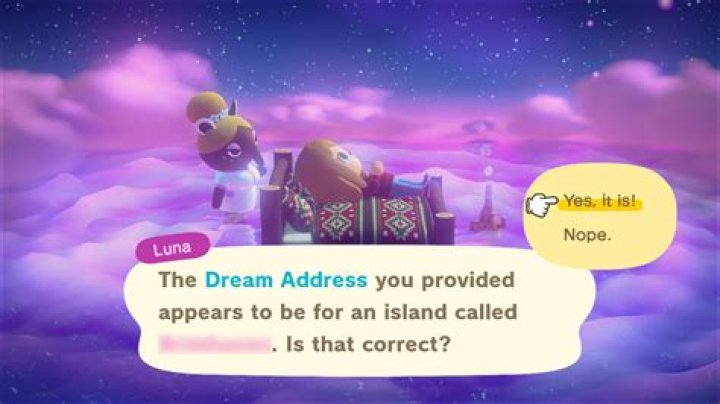
The first time you do this, you’ll meet a tapir named Luna who acts as a guide to dreaming. Luna will walk you through the basics of dreaming before you can begin browsing or upload your own island.
How To Visit Dream Islands
Your first option when dreaming is to visit other players’ islands. In order to do so, you’ll need your destination’s dream address. Similar to Switch friend codes or New Horizons creator codes, dream addresses are 12-digit codes preceded by “DA.” A friend will have to give you their dream address, or you’ll have to find one by browsing websites like Reddit and Twitter.
To enter a dream address and visit another player’s island in a dream, follow these steps:
- Lie on any bed and select “Yeah, I want to sleep”
- Select “I want to dream”
- Enter the desired dream address
Once Luna has connected you to the internet and downloaded the dream island, you’ll appear on your bed in the dream island’s plaza so you can begin exploring.
What Can You Do On A Dream Island?
While on an island, you can fully explore, enter the villagers’ and players’ houses, visit the museum, and talk to villagers; however, you cannot enter Resident Services, Able Sisters, or Nook’s Cranny. You also cannot bring any items with you–Luna will “hold” the items in your pockets for you until you wake up–and you won’t keep anything you find on the island.
You can also use the terminal outside Resident Services, which is the same kiosk you’ll normally find in Able Sisters, to download any of the player’s custom designs. For more information on how this works, see our guide to custom designs in New Horizons.
How To Leave A Dream Island
When you’re finished exploring a dream island, return to your bed outside Resident Services and lie down again. Follow Luna’s prompts to “wake up” and return to your real island.
How To Report A Dream Island
If you encounter a dream island with inappropriate content, you can press the minus button to report it while you’re still in the dream. Luna will then “wake” you.
How To Upload Your Island
In addition to exploring other players’ dream islands, you can also upload a dream version of your own island for others to visit. To do this and generate your own dream address:
- Lie on any bed and select “Yeah, I want to sleep”
- Select “I’d like to share a dream”
You can then share your dream address with other players.
Animal Crossing: New Horizons News And Guides
Discover all the details of one of the main novelties of the second part of the free summer update in Animal Crossing: New Horizons.
Just a few days ago, Nintendo confirmed that today, July 30, Animal Crossing: New Horizons would receive the second part of the free summer update, including a new character and some mechanics and surprises.
How to visit Luna in a dream
The main novelty of this update of Animal Crossing: New Horizons is the possibility of visiting Luna, a special Tapir who takes us in our dreams to visit the islands of other players. To access this new functionality it is enough to get into any bed in our house. In this way, Luna’s visit will automatically open and we will be able to select if we simply want to sleep or want to dream about the island of some other player.
If after sleeping, Luna still does not appear, you should check that you are playing the correct version of the video game (1.4.0). You can do it through the title screen, which indicates the version of Animal Crossing: New Horizons.
Therefore, virtually all players can access this functionality. However, it is worth noting two important details that we leave below:
- null
- An active subscription to Nintendo Switch Online is required
- This functionality will not be accessible while the server is under maintenance.
How to visit other islands in dreams
To visit another player’s island in the dream, you will need to enter a special address that each player must give you in advance. By entering the address, you will be sent to the island of the player in question and you can visit it entirely. Despite this, you will not be able to carry any type of object with you.
To get your home address, you just need to go to a bed in your house and talk to Luna, asking him to upload your island in the form of a dream. This can only be done once a day.
Once inside another player’s island, the only way to leave is by going back to the bed you came from. However, if for any reason you get stuck at any point, the Rescue Service is still available.
What can you do on other islands?
Visits through sleep are much more limited than through the aerodrome. First of all, they are not simultaneous, so you will not be able to see any other real player. The character that appears simply is an NPC with a predetermined phrase that each user can choose through their passport.
You cannot bring any items to the islands. In this way, you should not worry about vandalism when uploading your island to the Internet in the form of a dream. However, it is possible to interact with some objects on the islands that are visited to access possible designs. These can be downloaded and later used on our own island.
It is important to note that, since objects cannot be brought to visitors if your island requires objects to move (such as ladders or the pole), it is best that you leave them on the ground so that the rest of the Users can get hold of them and tour your entire island.
Animal Crossing: New Horizons is going to receive sewing and cooking
ACNH Director deletes her Twitter account after receiving numerous critical messages
You may like
Leave a Reply
AnimalCrossing
Following recent fan photos, we now bring you the official announcement. The officially licensed Animal Crossing: New Horizons Monopoly has been confirmed with details and images after being listed on the Entertainment Earth shop.
The information includes details on gameplay mechanics and more. Here are its features:
- From console to tabletop!
- Animal Crossing Monopoly offers new ways to collect and build worlds.
- Based on the colorful and creative world of Animal Crossing: New Horizons.
- Custom gameplay, game board, villager tokens, cards… and berries!
- Watch your island grow into something amazing!
And this is its description:
Hello, player! It’s time to take a break from the console and share your love for Animal Crossing: New Horizons with your family and friends gathered around this fun and exciting Monopoly Animal Crossing Edition game. Customized for Nintendo’s super popular game, it brings villager tokens and new ways to play, with collecting and world-building and of course… berries. Roll the special die to see what surprises await you under each Animal Crossing-themed card. There is also a Mini Nook die that determines what type of resources can be sold. Play and watch your island turn into something amazing! 2 to 4 players. 8 years and older.
In this Animal Crossing Edition Monopoly game, kids and adults can enjoy island life and immerse themselves in the colorful and creative world of Animal Crossing: New Horizons. After your first trip across the board, you choose an Ability card with an ability that you can use throughout the game. Moving around the board with custom tiles inspired by the video game, complete tasks on the island and meet other characters. Instead of buying property and paying rent, collect insects, fish, fossils, and fruits. You can also stop by Mini Nook and collect berries to buy decorations. These decorations are worth Nook Miles, and the player with the most Nook Miles wins the game!
Includes Game Board, 4 Character Tokens, 4 Skill Cards, 35 Decoration Cards, 14 Opportunity Cards, 14 Nook Miles Cards, 160 Resource Tokens, 40 Five Berry Coins, 54 Berry Coins, 40 Markers player, a numbered die, a Mini Nook die, a sticker sheet and the rules of the game.
Finally, it has been confirmed that, in the United States, it will be launched in August for $ 24.99, although some stores have already begun to distribute it. Surely in the following months, it will reach more territories.
Visit other people’s islands whenever you want!
Share this story
- Share this on Facebook
- Share this on Twitter
Share All sharing options for: Animal Crossing: New Horizons guide to Dreaming and Dream Addresses
Image: Nintendo EPD/Nintendo
Animal Crossing: New Horizons now has a dream feature, allowing players to visit other islands without having to go to the airport. The other player doesn’t even need to be online. (To use dreams, you’ll need a Nintendo Switch Online subscription.)
That said, you won’t be able to buy any items or pick any fruits if you’re visiting via a dream. This is mostly just to make it easier to share your creative vision with others. As an added bonus, it lets you invite people in without any fear of them trashing your place or stomping your flowers.
Luna, a tapir, will aid you in your sleep.
How to upload your island
When your lay in a bed in your house, it’ll ask if you want to sleep. Say yes, and you’ll see Luna, who will offer to help you out. To upload your island, tell her “I’d like to share a dream.”
After connecting to the internet, she’ll give you a Dream Address code to share that’ll represent your island. Your Dream Address will appear on your passport and on your map, so don’t stress about recording it when she tells you the code at first.
Note that you can only upload your island once a day.
How to visit other islands using dreams
After talking to Luna for the first time, you’ll be able to sleep at your house in any bed. Once you lay down, the game will ask if you want to dream. Select yes, and you’ll be enveloped in a purple fog before seeing Luna again. Tell her you “want to dream” and she’ll ask you for a Dream Address to enter. Once you input the island’s code, you’ll awake from your bed in front of the Resident Services of the island you chose to visit. As a reminder, you won’t be able to do much beyond taking in all the sights. But that’s fine!
When you’re ready to go back to your own island, just lay back in the bed.
This Animal Crossing: New Horizons Dream Guide includes how to get and share your dream address, how to dream, how to visit a dream island, and what you can and cannot do on a dream island.
How to Dream and Visit Other Islands
Here’s how to dream in ACNH so you can visit other islands. You cannot be wearing a Transformation aka Wand Outfit. If you want to visit other islands you need to have a dream address code ready. Players can share this code and leave it publicly posted on their passport/map if they so choose.
- Lay down on a bed in your house.
- Select “I want to sleep.”
- Select “I want to dream.”
- Connect to the internet.
- Enter the Dream Address Code.
- Explore the island.
- When you’re ready to leave, lie down on the bed.
How to Share Your Dream Address
Here’s how to share your dream address code so others can visit you even when you’re offline. You cannot be wearing a Transformation aka Wand Outfit.
- Lay down on a bed in your house.
- Select “I’d like to share a dream.”
- Accept the terms. Sharing Dreams means players – including ones you don’t know – will be able to visit a version of your island. This means your residents, island, homes, custom designs, and bulletin-board posts will be public (via Dreams).
- You’ll get a code that you can share with others! It will be on your passport and island map so don’t worry about writing it down. However you can get this code removed from your passport and map by asking Luna to change the privacy settings.
- Note: Your dream island is your island AS IS. If you make changes to it, it will not be visible to others until you share a new dream.
- Your Dream can be updated once per day.
Dream Islands vs Real Islands
Visiting an island via a Dream address isn’t the same as visiting an island through the airport. Note: You can’t bring anything with you to a Dream Island but Luna will hold your items for you so no need to frantically empty your pockets.
On the whole, you can basically only explore the island and download custom designs but below is a full breakdown on what you can and cannot do on Dream Islands.
Another update for the wildly popular Animal Crossing: New Horizons has finally arrived. While many will be focusing on setting off and collecting fireworks from the shady art dealer Redd, others will finally be able to freely visit someone’s island without them being online. Dubbed “Dream Suites,” this feature lets users visit other player’s islands and freely explore their world. However, there are a few differences between visiting a dream island and a regular one where the owner is around. This may be a bit confusing to Animal Crossing newcomers, so here’s everything you need to know about the Dream Suite!
How to Access the Dream Suite
To visit the Dream Suite, you need to go to your home and lay in a bed. It doesn’t matter what kind of bed, so long as it’s this type of furniture. When a text bubble appears, say that you want to sleep and you’ll quickly become enveloped in a pink haze. Luna will then approach you and explain the basics of Dream Suite before asking if you want to visit someone’s island or get a dream code to share for your own island!
Unfortunately, you will still need the numbered code for someone’s island to visit and vice versa. This is simply a method to go to an island when a player isn’t online, so it can be accessed at any time by other users. Once you input the code, Luna will explain that you cannot bring anything with you and take your items. After that, you’ll be whisked away to the island and allowed to wander around to your heart’s content.
What Can You Do On a Dream Island?
Here’s where things begin to differ, as there are a number of restrictions when it comes to visiting someone’s island via the Dream Suite. The first and most obvious is you cannot interact with the player who created the world at all. During my testing across multiple islands, I was unable to even find one human-controlled villager, so don’t expect to talk to them. Additionally, you are unable to visit any of the shops or purchase items from them. Finally, you cannot catch, dig, fish, or use any of your tools during the visit. Luna will take them all away and the Dream Suite disables your ability to pick things up.
What you can do is roam around the island freely, speak to the NPC villagers, interact with objects placed in the environment, and use your Nook Phone. Players can also enter other user’s houses freely, so make sure to tidy up before inviting guests over! Perhaps the coolest feature, is you can access the Custom Designs terminal by Luna to grab any design made by that creator. This is a great way to gather designs for your own island such as custom paths, clothing, or wallpaper.
Once your done visiting someone’s island, go back to Luna and lay down in the bed. Select “I want to wake up!” to end the dream and return to your island. This feature can be accessed at any time, so make sure to visit other player’s islands if you need inspiration. The Dream Suite is a permanent addition to Animal Crossing: New Horizons and will remain once the summer event is over.
animal Crossing: New Horizons
Visiting other people’s islands can be something of a pain in Animal Crossing: New Horizons. Under the old system, you needed to be online at the same time as whoever you wanted to visit in order to coordinate a playdate, which can be tricky for all sorts of reason. Not so with the new dreaming update, out last night for download. Now we’ve got a helpful mystical anteater that will allo
The basics: a dream is a way to visit an island without having to coordinate without being online at the same time as the owner. Basically, you can make a copy of your island that lives on Nintendo’s servers, and other people can access it whenever they choose via a Dream Code.
The system works because this is a dream, and so you can’t bring things with you or make any permanent changes to the island. If you let people visit your island, it won’t affect your town in the slightest.
To get started, you need to make sure you have an active Nintendo Switch Online membership, and that you’ve updated your game to the latest version.
After that, you need to go to sleep. So put a bed-type of item in your house (Luna will send you one in the mail if you don’t have one), and lie down. This will only work indoors, so don’t try making an outdoor dream area. The game will ask yo if you want to sleep, and if you agree you’ll be whisked off to a purply ethereal cloud land.
After that, Luna will give you the rundown on how it works.
At this point, you can either visit someone else’s island with a dream code, or you can upload your own to generate your own code to share. You will need a code to visit any island, however, so you’ll need to go out looking for those.
You can view this information in the Nintendo Switch Online mobile app.
Animal Crossing: New Horizons recently added a dreaming feature that allows players to visit other players’ islands in dreams with the help of Luna, a friendly Tapir. (Check out our complete guide to the dreaming feature to learn more.)
You can only visit another player’s island in a dream if you know their Dream Address. While you can easily find Dream Addresses shared by other players online, players can also share their Dream Address privately with friends if they only want a few visitors.
As reported by Game8, you can view the number of visitors your dream has had by heading into the NookLink area of the Nintendo Switch Online mobile app on your iOS or Android device.
Here’s how to see how many people have visited your island in a dream!
Open the Nintendo Switch Online mobile app and select Animal Crossing: New Horizons.
Source: SuperParent
Select “Passport.”
Source: SuperParent
Now, tap “Recent dreams.”
Source: SuperParent
Tap your island under the “Your island’s dream:” heading near the top of the screen.
Source: SuperParent
On the window that pops up, look for the phrase “Number of visitors your dream has had:.” The number to the right of this phrase shows you how many players have visited your island in a dream! (For reference, in our screenshot below, the number is “0” because we haven’t shared our Dream Address with anyone else.)
Source: SuperParent
You can repeat these steps at any point in the future when you want to see the current number of visitors your island has had.
To learn more about Animal Crossing: New Horizons, or to view the rest of our guides for the game, check out our previous coverage.
Disclosure: Nintendo gave SuperParent a code for Animal Crossing: New Horizons for coverage purposes.
Editor-in-Chief
Brandy Berthelson has been writing about video games and technology since 2006, with her work appearing on sites including AOL Games, Digital Spy, and Adweek’s Social Pro Daily. When she’s not gaming, Brandy enjoys crafting, baking, and traveling with her husband.
Animal Crossing New Horizons’ wave 2 summer update has arrived earlier than expected. It brings with it fireworks and backup saves, but it also adds the ability to dream and meet a blonde tapir named Luna. Here you’ll discover how to get a dream address in Animal Crossing New Horizons and how to find other codes.
While the first wave of the summer update added the ability to swim and dive, as well as meet a new villager Pascal, one of the highlights for wave 2 is fireworks. These can be seen every Sunday at 19:00 throughout August so make sure to be on your island to see some pretty lights.
But, away from fireworks that hopefully won’t scare any of your villagers, the Animal Crossing New Horizons wave 2 update also adds the ability for you to share your own dream address as well as input other peoples’ codes.
- ANIMAL CROSSING: How to get the King Tut mask DIY recipe in New Horizons
How to get a dream address in Animal Crossing
You get a dream address in Animal Crossing New Horizons by downloading summer update wave 2.
Once you’ve downloaded the summer update wave 2, you must then retrieve a gift from Luna in your mailbox to eventually get a dream address in Animal Crossing New Horizons.
After you have retrieved the gift which is Luna’s bed, place it anywhere in your home and lie on it to go beddy-byes.
Pokémon Legends Arceus: A familiar region. A new story.
Select the “Yeah, I want to sleep…” option and you’ll quickly wake up in a realm engulfed in purple clouds while in a dream-like state.
Luna will basically explain the premise of dream travelling to you, and to get a dream address simply select the share option.
Once you have shared a dream and received an address, you can then update it but only once a day by revisiting Luna and selecting “about the dream I shared…”.
After selecting the above option, you can either update said dream, adjust its privacy, or simply delete it.
Adjusting its privacy is good if you don’t want your dream address to be visible by everyone on your passport.
How to enter dream addresses and codes in Animal Crossing New Horizons
You enter dream addresses and codes in Animal Crossing New Horizons by visiting Luna.
Once you’ve visited Luna in Animal Crossing New Horizons, to visit other dream addresses and codes choose the “I want to dream” option.
When in someone else’s paused reality, nothing you do will be permanent so explore to your heart’s content.
Speak to other villagers and even speak to the island’s creator. The island’s creator will say whatever the comment is on their passport.
So, if you want to control what your own virtual self says to visitors exploring your dream island, simply change the comment on your passport ASAP.
- NEW HORIZONS: Here’s all the fish and bugs leaving Animal Crossing in August
Have something to tell us about this article? Let us know
While the Dream Suite has finally arrived in Animal Crossing: New Horizons, it has come with some big changes. In previous games the feature allowed you to visit random islands, exploring places hosted by people you’ve never met before. This allowed you to discover new locations and decoration ideas that you might not otherwise have encountered. But for New Horizons there’s no random feature or any way to visit an island without the Dream Address. So we’ve compiled a few favorites, listing off the best islands to visit via Dream Suite in Animal Crossing: New Horizons.
The Best Islands to Visit via Dream Suite
This list will need to change a lot. The feature has only been available for a few hours (click here to see how to use Dream Suite), so people haven’t tailored their island in any way beyond how they wanted it to look. Also, we’re waiting for everyone to upload their island in the first place. No doubt there are some amazing islands out there to visit, and this is just a small sampling of them. We’ve mostly pulled from users on the Animal Crossing subreddit or on Twitter, but will be looking for new ones all the time and updating this list, so check back often. So, here’s our current favorites…
White Trolley’s Walt Disney World themed island: DA-8322-2191-1464
And midheavenmusic has another WDW themed island to check out: DA-9627-3271-2767
ao419’s epic Rikoka island: DA-4564- 6321-5532
LilaWildstar’s aptly named Quarantina: DA-9209-6916-6312
bof_fri_fleu is hosting a slightly early haunted house on this five star island: DA-3944-5250-2664
Head to Nowhere via this Dream Address: DA-1790-5385-6731
Elissa May’s beautiful Starlight Island is here: DA-6864-3462-4160
Get some Serenity: DA-8191-2677-7268
Dive into Fantasea Island: DA-9983-8806-4086
So that’s the early contenders for the best islands to visit via Dream Suite in Animal Crossing: New Horizons. And if you want to visit my own Kon Island just enter the dreaam address DA-0178-4603-6130. This list will change a lot as more players jump on and get their Dream Address registered. Note though that the island can always be taken down or changed, so these codes might not always work. If that happens just check back later for an update.